Turn Your Phone into a Digital Art Studio: 15 Free & Open-Source Drawing Apps for Android

Yesterday, in our weekly English speaking club, I met someone who totally rewired my view of mobile creativity.
She’s a passionate artist, and every single one of her stunning drawings? Done on her Android phone, during the shortest breaks between classes, while waiting for the bus, or even just sitting at a café with friends. Her gallery? A breathtaking collection of sci-fi characters, futuristic cities, alien landscapes, and imaginative worlds, all drawn in moments most people would call “dead time.”
I was stunned. Not just by her talent, but by how effortlessly she turned idle minutes into creative gold.
Then it hit me: Why aren’t more people doing this?
A few years ago, I had a similar conversation with a friend whose daughter was drawing beautifully on her tablet, not because she had expensive tools, but because she’d found a simple, free app that let her create without distractions. When I casually mentioned open-source apps, she looked confused. “What’s open-source?” she asked. “And how can an app be free… without ads taking over the whole screen?”
That moment sparked this article.
You Don’t Need Expensive Tools to Be Creative
You don’t need a $2,000 graphics tablet or a subscription to Adobe Fresco to make amazing art.
All you need is your Android phone, and the right app.
The best part? There are free, open-source drawing apps that give you full creative control, no paywalls, no hidden fees, and zero intrusive ads blocking your canvas.
These apps are built by passionate developers who believe art should be accessible to everyone, especially young creators, students, and busy artists who want to draw anywhere, anytime.
How can drawing on phone help people with ADHD?
Drawing on your phone isn’t just fun, it’s a game-changer for people with ADHD. When your mind races, sketching helps ground you in the moment.
There is no pressure, no rules, just doodling whatever comes to mind. It’s like a mental reset button. You can draw during breaks, while waiting, or even when you’re feeling overwhelmed. The act of focusing on lines, colors, and shapes gives your brain a healthy outlet.
Moreover, having a free, ad-free app means no distractions, just pure creative flow. Whether it’s a wild sci-fi character or a messy abstract swirl, every stroke is a win.
And hey, if you love it? You’ve got a whole gallery of your own thoughts, right in your pocket.
1- FreePaint

FreePaint is a free, open-source vector drawing app for Android that turns your ideas into clean, scalable SVGs. With Material Design 3, it features dynamic colors and a modern, intuitive interface. You can create custom document sizes, adjust stroke and fill colors, and fine-tune line thickness.
The Paint tool lets you draw open or closed paths, perfect for sketches, icons, or illustrations.
The Eraser tool works smartly: erase entire closed paths (they turn green) or delete individual points from open paths, even splitting them into new segments. Use the Pan/Zoom tool with one or two fingers to navigate your canvas effortlessly.
The Selection tool allows marquee selection of overlapping paths, which you can then move or reposition. Save and load SVG files easily. This is ideal for sharing, editing later, or using in web projects. Simple, powerful, and made for creativity on the go.
You can easily download the app from F-Droid Store, or you can build it from the source.
2- Simple Draw

Simple Draw is a free, super-simple drawing app that turns your Android device into a digital sketchpad, no fancy tools, no clutter, just pure creativity. Whether you're sketching wild doodles, quick ideas, or colorful art, this app makes it effortless.
Choose from customizable pens, vibrant colors, and even add custom hex codes for perfect shades. Change backgrounds with solid colors or your own images, perfect for layering ideas. Erase mistakes in a flash, save in PNG, JPG, or SVG format, and share your masterpieces instantly via email or social media.
It works completely offline, so inspiration never waits.
Ideal for artists, students, ADHD creators, and anyone who loves to draw on the go. No ads, no subscriptions, just fun, fast, and free.
 SimpleMobileTools
3- ExcalDraw

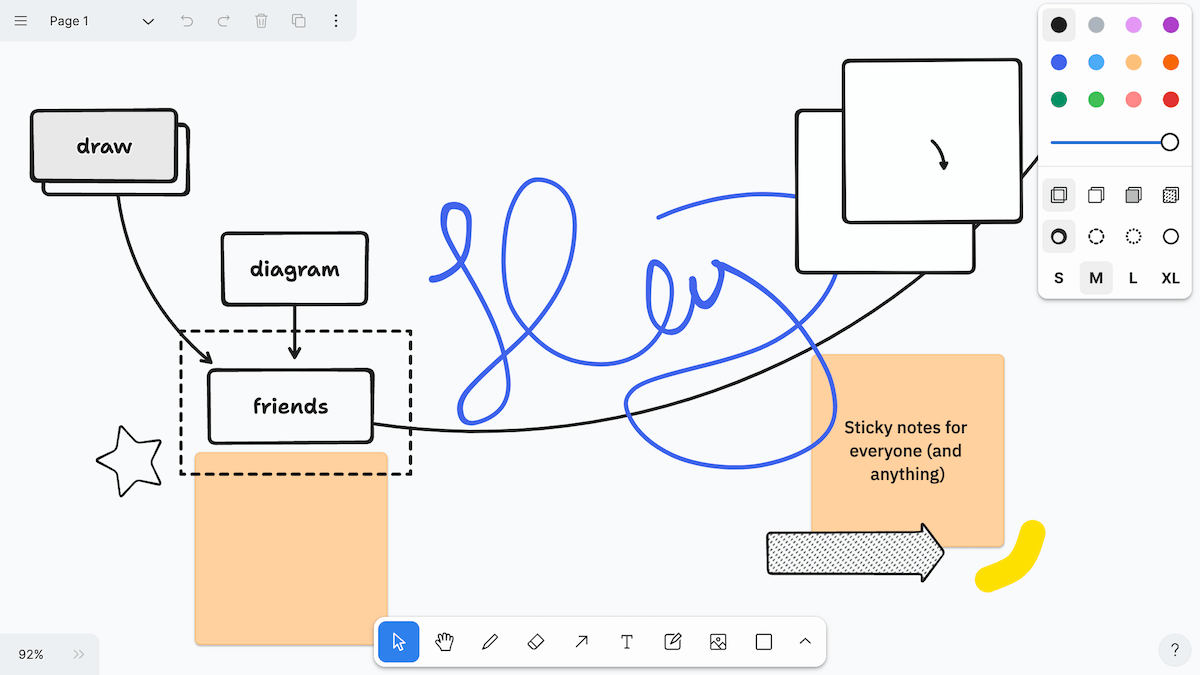
Excalidraw is the ultimate open-source, hand-drawn style whiteboard for creative minds. Unlike traditional tools, it delivers a natural sketch feel with infinite canvas, dark mode, and real-time collaboration, all end-to-end encrypted for privacy.
The app is perfect for wireframes, brainstorming, or diagrams, it supports SVG/PNG export, shape libraries, and even image embedding. Built with React and MIT-licensed, it’s free, fast, and endlessly customizable.
Whether you're a designer, student, or remote team, Excalidraw blends digital creativity with analog charm, no ads, no paywalls, just pure, collaborative expression.
While is is built as a web app, it runs with a responsive clean interface on Android screen, as it works with all modern Android web browsers smoothly.
The best thing is, that you can download it, install it on your server or local machine and run it easily on your Android or even iOS using any web browser.
 excalidraw
4- Drawing

This is yet another free and simple app for Android that enables the users to draw and fill colors for their drawings easily. You can download it directly from Google Play.
It is perfect for kids and teens, especially who has ADHD.
 Krishna app worlds
5- Sketching

Privacy Friendly Sketching or Sketching PFA is the ultimate ad-free, permission-light drawing app for Android. Sketch quickly, securely, and privately with no tracking or data leaks. Choose custom background colors or import images, draw with vibrant brushes, adjust thickness & transparency, and enjoy smooth zoom/scroll.
Undo/redo, export as PNG, and share instantly, all while your sketches stay encrypted. No ads, no bloat, no unnecessary permissions.
It is a great choice for artists, students, and privacy-first creators. Free, open-source, and built for peace of mind.
You can download it directly using F-Droid app store, as it is not available in Google Play (yet).

6- Linwood Butterfly

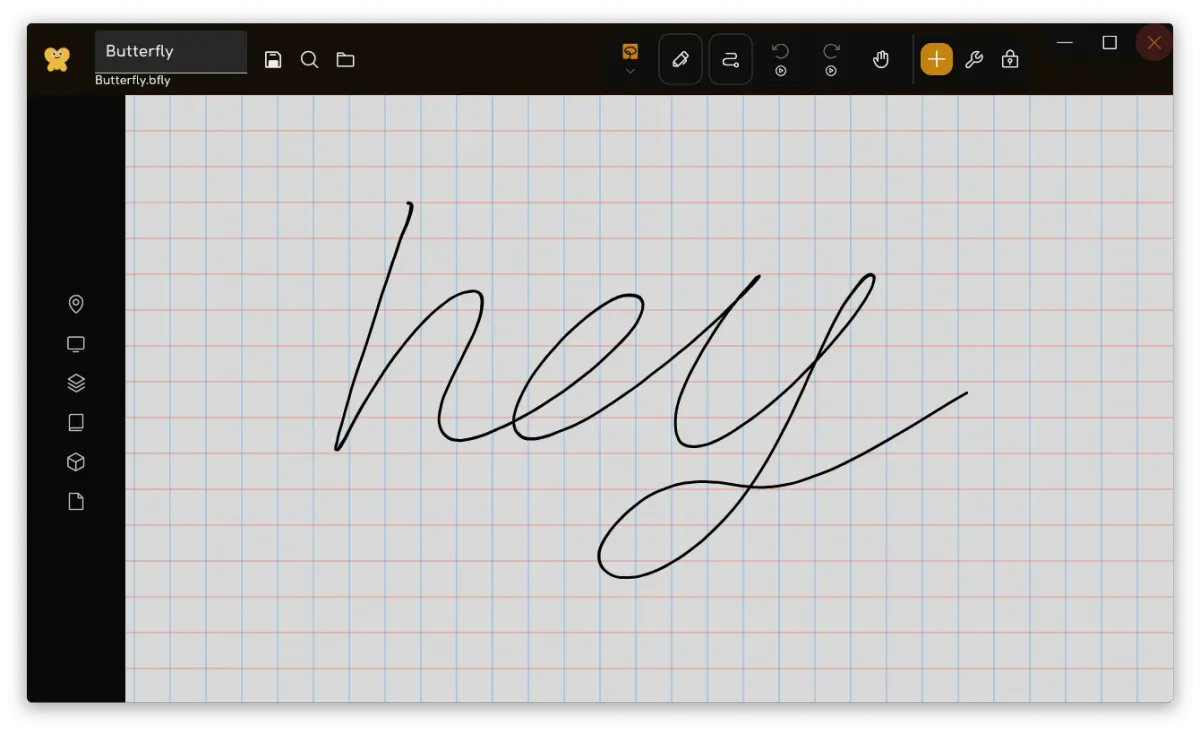
Butterfly is a cool open-source app designed for artists, thinkers, and creators who value freedom, simplicity, and privacy. With an infinite canvas, smooth stylus support, and a clean, intuitive interface, Butterfly lets you paint, write, sketch, and organize ideas in seconds.
Draw with custom brushes, add text in any font or color, insert shapes, photos, or even import PDFs and SVGs. Perfect for artists, illustrators, and ADHD creatives who thrive on visual thinking. Works across Android, Windows, Linux, and web, sync your work anywhere, store it locally or in your cloud (WebDAV), and export anytime.
It is Fully open-source, ad-free, and offline-ready.
 Hazem Abbas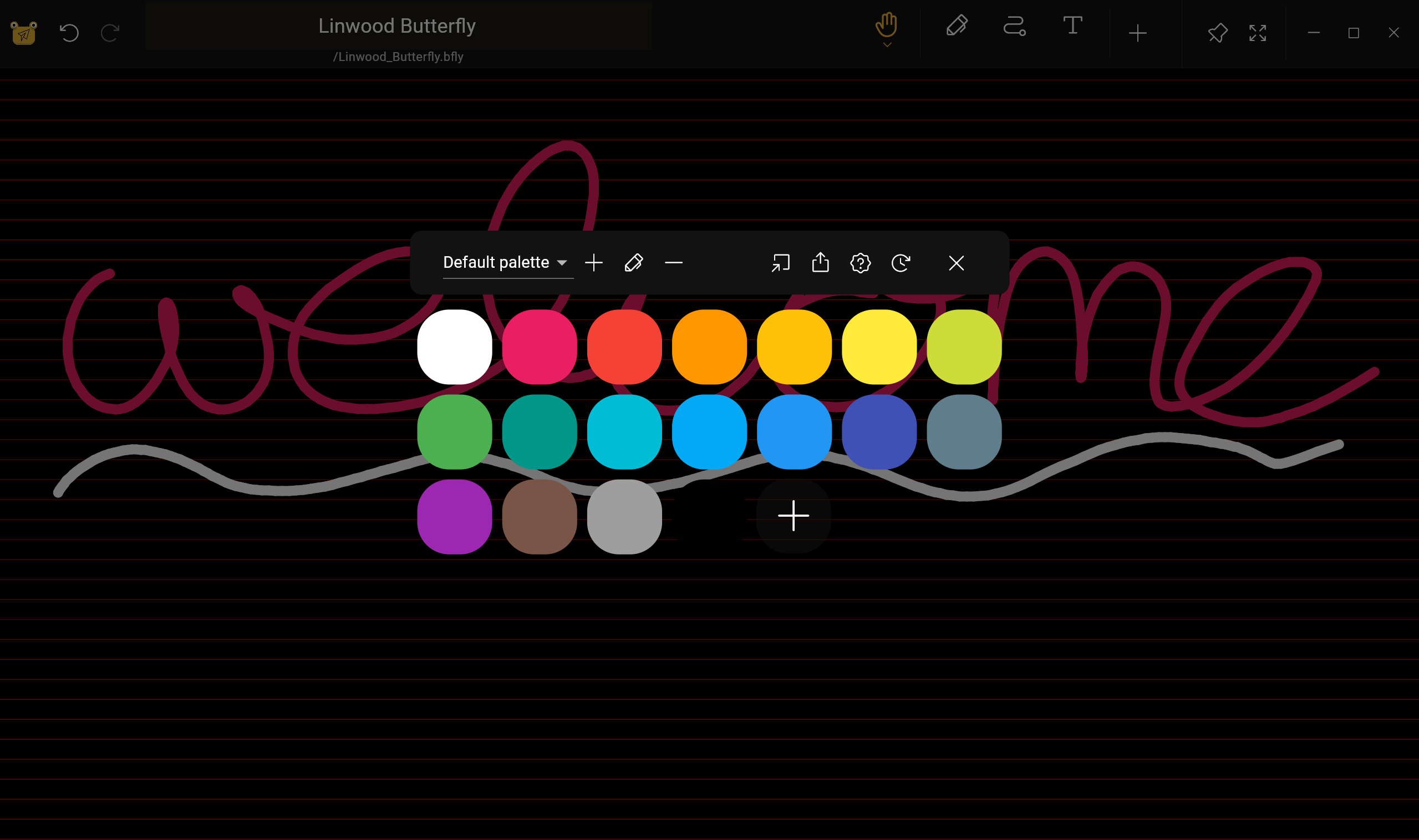


7- DrawAnywhere

DrawAnywhere is yet another free and open-source app that lets you sketch, annotate, and highlight directly over any screen, perfect for video tutorials, live presentations, or studying. Use stylus buttons to toggle eraser, enjoy 50-step undo/redo, and enable touch passthrough to interact with the app below.
Minimal storage use, transparent toolbar, and auto-clear on hide keep things clean. Hide the canvas at startup for a distraction-free experience.
It is a good option for educators, students, and presenters who need real-time drawing without interruption.

8- Drawpile

Drawpile lets you draw, paint, and animate in real time with others on the same canvas. It is perfect for collaborative art, brainstorming, or live tutorials. Works on Android phones and tablets, optimized for stylus use but supports touch too.
The app is free, open-source, and ideal for artists, educators, and creative teams. Draw together, anywhere, anytime.
The good news is, it kinda works everywhere, desktop, web and mobile.
9- Fossify Paint Beta

Fossify Paint is your pocket-sized creative playground, it is free, fast, and totally ad-free! Doodle, sketch, or paint with zero hassle. Customize brushes, pick any color (even hex codes!), and save in PNG, JPG, or SVG. No permissions, no tracking, just pure, private fun.
It is built for artists, students, and dreamers who love drawing on the go.

10- Memento
While not an actual drawing app, Memento is a note taking app that allows users to make a creative handwritten notes and drawing and save them as notes.

11- RetroDrawing

This is a drawing app with low resolution and a fixed 32 color palette. Has various tool: small, medium and large pen, fill bucket, color picker, full undo support etc.
It is basically for kids, but also can benefits adult to relax.
12- Doodle Dudette

If you are a fan of doodle art, then this app is for you, try to doodle birds, pets, animals and make funny art and publish it everywhere.
13- Fluffyboard

Fluffyboard is a free, open-source, self-hosted whiteboard app built with Flutter.
It enables you to create online or offline boards, draw shapes, add text, images, and PDFs, organize with folders, share with read/write permissions, and sync settings.
It supports zoom, bookmarks, custom backgrounds, and movable toolbars, perfect for remote teams, students, and creatives who value privacy and flexibility.
The good news is that you can download it from F-Droid store.

14- Krita

Yes, you herd right, Kirta the amazing desktop drawing app for Linux, can run now on Android and it supports 2D animation as well.
By default, Kirta supports vector art, comes with layer based management system for your artwork, and none-destructive layers and masks which are kinda of a dream for making Art on mobile.
15- SketchApp
SketchApp is a lightweight, Android Studio-built sketching app designed for Pixel phones and larger screens.
With it you can draw with customizable brush and canvas colors, erase with precision, and undo/redo up to 50 steps. Save your artwork directly to the phone gallery, zoom in/out, and pan freely across the infinite canvas.
Hide the UI for a distraction-free drawing experience. Perfect for quick doodles, idea sketches, or on-the-go creativity, simple, smooth, and built for touch and stylus users. Free, fast, and made for mobile artists.
 danielvnguyen
More?
 Hazem Abbas