23 Open-source Free AWS S3 Client for Windows, Linux, macOS, and the Web


Amazon AWS S3 or Amazon Simple Storage Service is service by Amazon Web Services that offers a cloud secure storage for developers, enterprise and individuals.
Amazon S3 is a reasonably priced data storage service. Ideal for off-site file backups, file archiving, web hosting and other data storage needs.
It is generally more reliable than your regular web hosting for storing your files and images.
It enables you to organize and manage your data in ways that support specific use cases, enable cost efficiencies, enforce security, and meet compliance requirements.
In this post, you will find a collection of the best open-source free Amazon S3 clients that include desktop apps, web apps, and command-line tools.
1- Commander One
Commander One is a sleek, dual-pane file manager for macOS that effortlessly integrates with Amazon S3 and other popular cloud storage services like Wasabi and other S3-compatible storages. With Commander One, you can mount S3 buckets as local drives, drag and drop files, upload, download, and manage cloud data with just a few clicks.
Its intuitive user interface allows for fast, secure file transfers, while advanced features like unlimited tabs, advanced search, and built-in archiving ensure a smooth workflow. Whether you’re managing files locally or in the cloud, Commander One offers the perfect balance of simplicity and power.
Key Features:
- Dual-pane view for quick file navigation and management
- Mount S3 and cloud storage as local drives for seamless access
- Fast file transfers with drag-and-drop support for cloud syncing
- Unlimited tabs for enhanced multitasking and efficient file management
- Advanced file search for quick and accurate file retrieval
- Support for FTP/ SFTP, making remote file management a breeze
- Cloud data management with upload, download, copy, and permission settings
- Intuitive interface designed for ease of use with macOS integration
- Terminal integration for advanced users needing command-line access
- Dark Mode and full macOS compatibility
Proprietary software (not open-source), offering superior features and performance compared to open-source alternatives, making it a preferred choice for professionals.
2- CloudMounter
CloudMounter is a versatile cloud storage manager available for both Windows and macOS, designed to seamlessly integrate Amazon S3 and other cloud services into your native file system. By mounting cloud storage as local drives, CloudMounter allows you to manage files directly from Finder or File Explorer without the need for additional applications.
It supports multiple AWS accounts and S3-compatible services, offering a unified interface for efficient file management. With strong encryption, offline access, and the ability to transfer files between cloud services, CloudMounter provides a streamlined solution for handling cloud data.
Key Features:
- Dual-platform support: Available for both Windows and macOS.
- Mount Amazon S3 as a local drive in Finder or File Explorer.
- Support for multiple AWS accounts and S3-compatible services.
- Client-side encryption for secure data storage.
- Integration with FTP, SFTP, WebDAV, and other protocols.
- Regular updates to enhance features and security.
Proprietary software (not open-source), providing superior functionality and reliability compared to open-source alternatives, offering enhanced performance and security for cloud data management.
3- S3 GUI
This is a free and open-source S3 desktop client that is built with Flutter.
 aminalaee
4- WinSCP
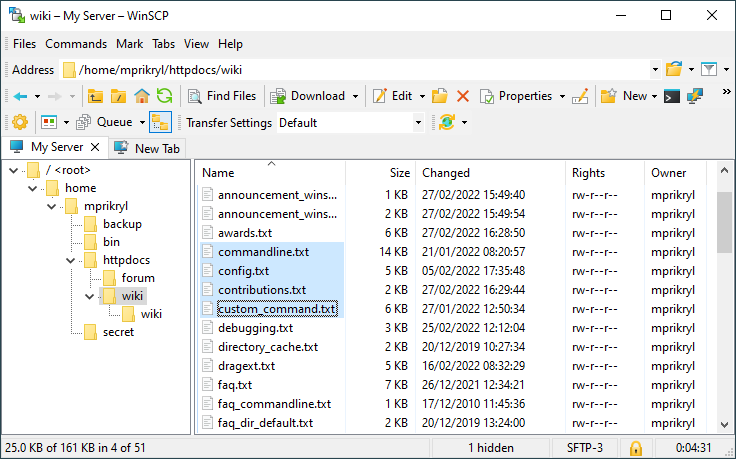
WinSCP is a popular free SFTP and FTP client for Windows, a powerful file manager that will improve your productivity. It offers an easy to use GUI to copy files between a local and remote computer using multiple protocols: Amazon S3, FTP, FTPS, SCP, SFTP or WebDAV.
WinSCP can copy files between two local folders too. Power users can automate WinSCP using .NET assembly. WinSCP is available in English and many other languages.
porters5- s3-client
This is a simple Python script that works directly with S3. It is released under the MIT License.
Key features
- Authorization is performed using environment variables
- Examples available
- Upload files
- List objects in a bucket
- Download objects
6- S3 Browser
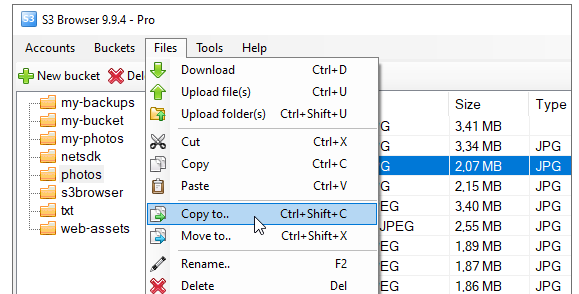
S3 Browser is a freeware Windows client for Amazon S3 and Amazon CloudFront.
Amazon S3 provides a simple web services interface that can be used to store and retrieve any amount of data, at any time, from anywhere on the web.
Amazon CloudFront is a content delivery network (CDN). It can be used to deliver your files using a global network of edge locations.

7- Bonkey
Bonkey is a user-friendly application that enables users to backup your files to Amazon S3. It can runs on Windows, Linux, and macOS.
Bonkey is released under the Apache 2.0 License.

 bonkey
8- Cyberduck
Cyberduck is a free Libre file transfer client for macOS and Windows. Command line interface (CLI) for Linux, macOS and Windows.
It supports FTP, SFTP, FTPS and Amazon S3.
storswift9- Rclone
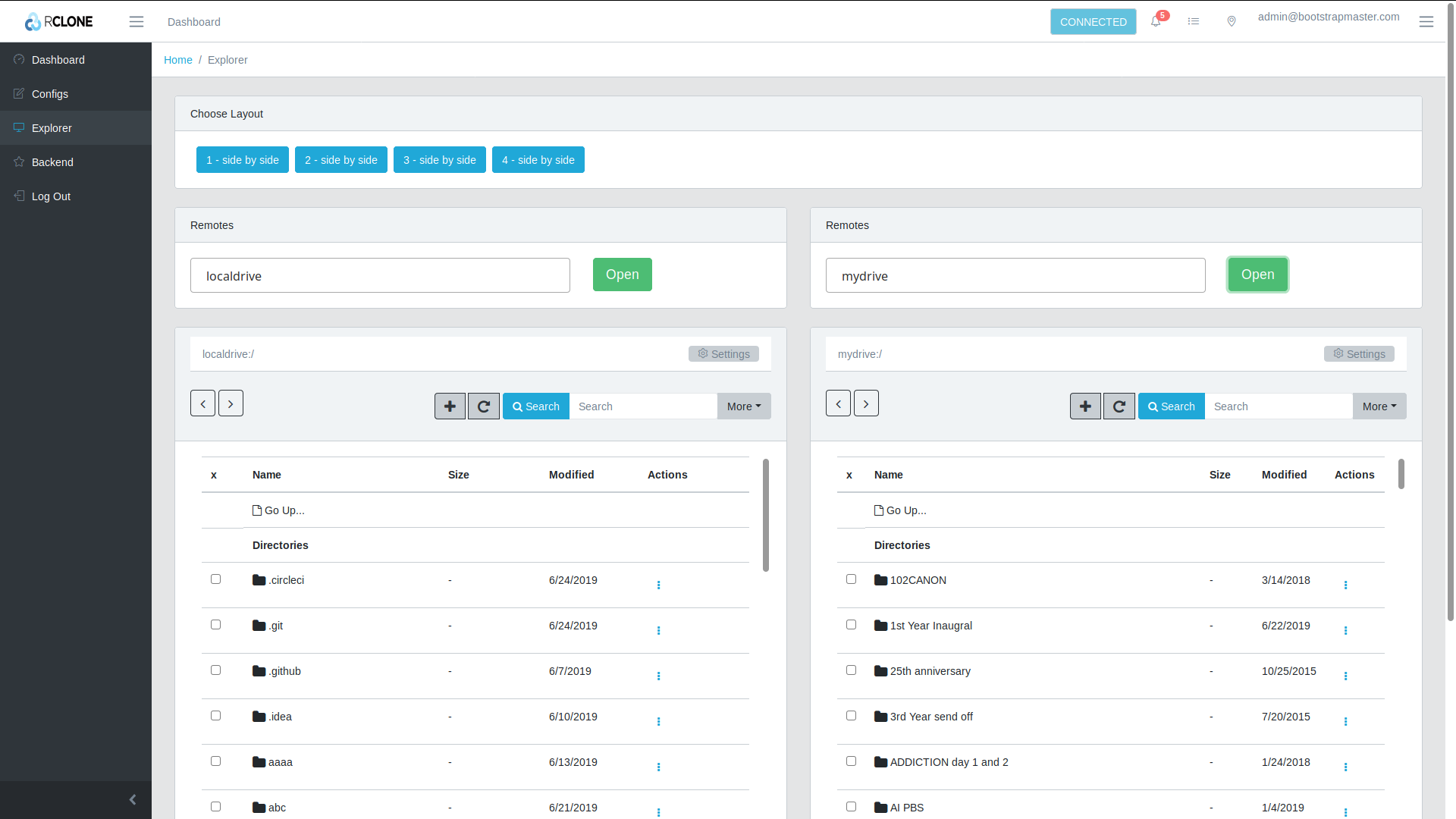
Rclone is a command line program for syncing files and directories to and from various cloud storage providers, including Google Drive, Amazon Drive, S3, Dropbox, Backblaze B2, One Drive, Swift, Hubic, Cloudfiles, Google Cloud Storage, Yandex Files and many more.
Features
- MD5/SHA1 hashes checked at all times for file integrity
- Timestamps preserved on files
- Partial syncs supported on a whole file basis
- Copy mode to just copy new/changed files
- Sync (one way) mode to make a directory identical
- Check mode to check for file hash equality
- Can sync to and from network, e.g. two different cloud accounts
- Encryption backend
- Cache backend
- Chunking backend
- Union backend
- Optional FUSE mount (rclone mount)
- Multi-threaded downloads to local disk
- Can serve local or remote files over HTTP/ WebDav/ FTP/ SFTP/dlna
- Experimental Web based GUI
10- WinS3fs
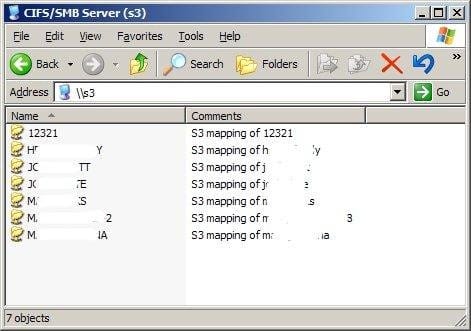
WinS3fs is a filesystem for Windows allowing access to Amazon S3 Storage. It implements a local virtual SMB server \\s3 to allow access to Amazon S3 buckets.
The app is released under a mixed license that include GNU General Public License version 2.0 (GPLv2), and Apache License V2.0.
techontap
11- JS3tream
JS3tream is a free and easily backup files to the Amazon S3 Web Service Storage using Windows, Linux (Ubuntu, Fedora, Debian, Arch Linux, Linux Mint) or macOS.

12- AsyncAws S3 Client
This is an API client for S3. AsyncAws has implemented the most popular API clients. If you want to upload a 1 Gb file, you really don't want to put that file in memory before uploading. You want to do it a smarter way.
AsyncAws allows you to upload files using a string, resource, closure, or an iterable.
Features
- API client for S3
- Documentation available
- The authentication parameters is read from the environment by default
- Examples available
- Async Aws will read the output before sending the request which could have a performance impact
- Add tags to a bucket
13- S3Sync
S3Sync is a free and open-source fast sync tool for AWS S3. It is written in Golang, and support multi-threaded file transfer out-of-the box.
Key Features
- Multi-threaded file downloading/uploading
- Can sync to multiple ways:
- S3 to local FS
- Local FS to S3
- S3 to S3
- Retrying on errors
- Live statistics
- Rate limiting by objects
- Rate limiting by bandwidth
- Flexible filters by extension, Content-Type, ETag and object mtime
larrabee14- Mountain Duck
Mountain Duck is a multi-platform app that enables you to mount server storage easily for macOS and Windows.
It supports FTP, sFTP, FTPs, WebDAV and Amazon S3. It supports smart file sync, and integrates with file managers for Windows and macOS.
 iterate GmbH
15- fs3
fs3 is an Amazon S3 compatible client and server implementation enabling centralized file storage web services ideal for multi-server applications. Users can develop potential S3-based applications using only a typical Apache PHP environment.
fs3 is not a replacement for Amazon's Simple Store Service (S3). fs3 runs on a user-controlled server and the API is a subset of Amazon's offering focusing on file management with real files, not databases.
The objective is to provide the minimal key services, fast and reliably, using a typical Apache web server installation. Amazon offers a very robust service with an SLA, customer support and more features.
The fs3 remote client, fs3RemoteClient is compatible with Amazon's S3 service, so switching between the fs3 server and Amazon's system will be easier. Amazon S3 clients may be compatible with fs3 out of the box.

16- S3Express
S3cmd is a free command line tool and client for uploading, retrieving and managing data in Amazon S3 and other cloud storage service providers that use the S3 protocol, such as Google Cloud Storage or DreamHost DreamObjects.
It is best suited for power users who are familiar with command line programs. It is also ideal for batch scripts and automated backup to S3, triggered from cron, etc.
S3cmd is written in Python. It's an open source project available under GNU Public License v2 (GPLv2) and is free for both commercial and private use. You will only have to pay Amazon for using their storage.

17- STU
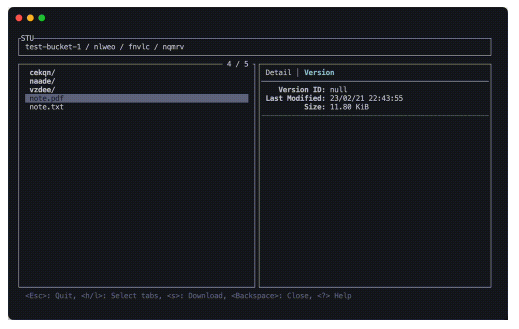
STU is a free and open-source TUI application for AWS S3 written in Rust using ratatui. It is released under the MIT License.
lusingander18- S3 Web Uploader
S3 Web Uploader is a minimalistic UI to conveniently upload and download files from AWS S3/ DigitalOcean Space/MinIO.
Features
- Adding file(s) from AWS S3.
- Track multiple upload progress through one consistent UI.
- Angular based web client for uploading/downloading file(s) from AWS S3
- Tree-like folder browser so you can find the files you want faster
- Drag-and-drop upload with support for single file, multiple files and folder upload
- Securely encrypt credential with standalone master password and save in browser
- Support multiple account Login
- Securely encrypt credential with standalone master password and save in browser
- Options to rename files during upload
- Support Virtual-host style endpoint
gaplo91719- s3cmd
S3cms is a free and open-source tool to access Amazon S3 file storage. S3cmd is a free command line tool and client for uploading, retrieving and managing data in Amazon S3 and other cloud storage service providers that use the S3 protocol, such as Google Cloud Storage.
Lots of features and options have been added to s3cmd since its very first release in 2008.
alltry20- AWS CLI s3 sync for Node.js
AWS CLI s3 sync for Node.js is a modern TypeScript client to perform S3 sync operations between file systems and S3 buckets, in the spirit of the official AWS CLI command. AWS CLI installation is NOT required by this module.
Features
- Sync from an S3 bucket to a local file system
- Sync from a local file system to an S3 bucket (with multipart uploads support)
- Sync from an S3 bucket to another S3 bucket
- Sync only new and updated objects
- Support AWS CLI options
--delete,--dryrun,--size-only,--include,--exclude,--follow-symlinks,--no-follow-symlinks - Support AWS SDK native command input options
- Monitor sync progress
- Sync any number of objects (no 1000 objects limit)
- Transfer objects concurrently
- Manage differences in folder structures easily through relocation
jeanbmar21- Quillen
Quillen is a free and open-source app that enables you to back up your important files to Amazon S3 with minimum data transfer and storage. It has a command line interface to maintain simplicity.
22- Filestash
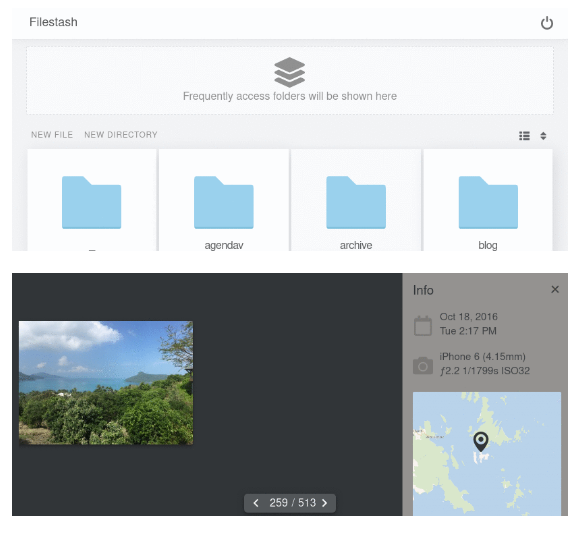
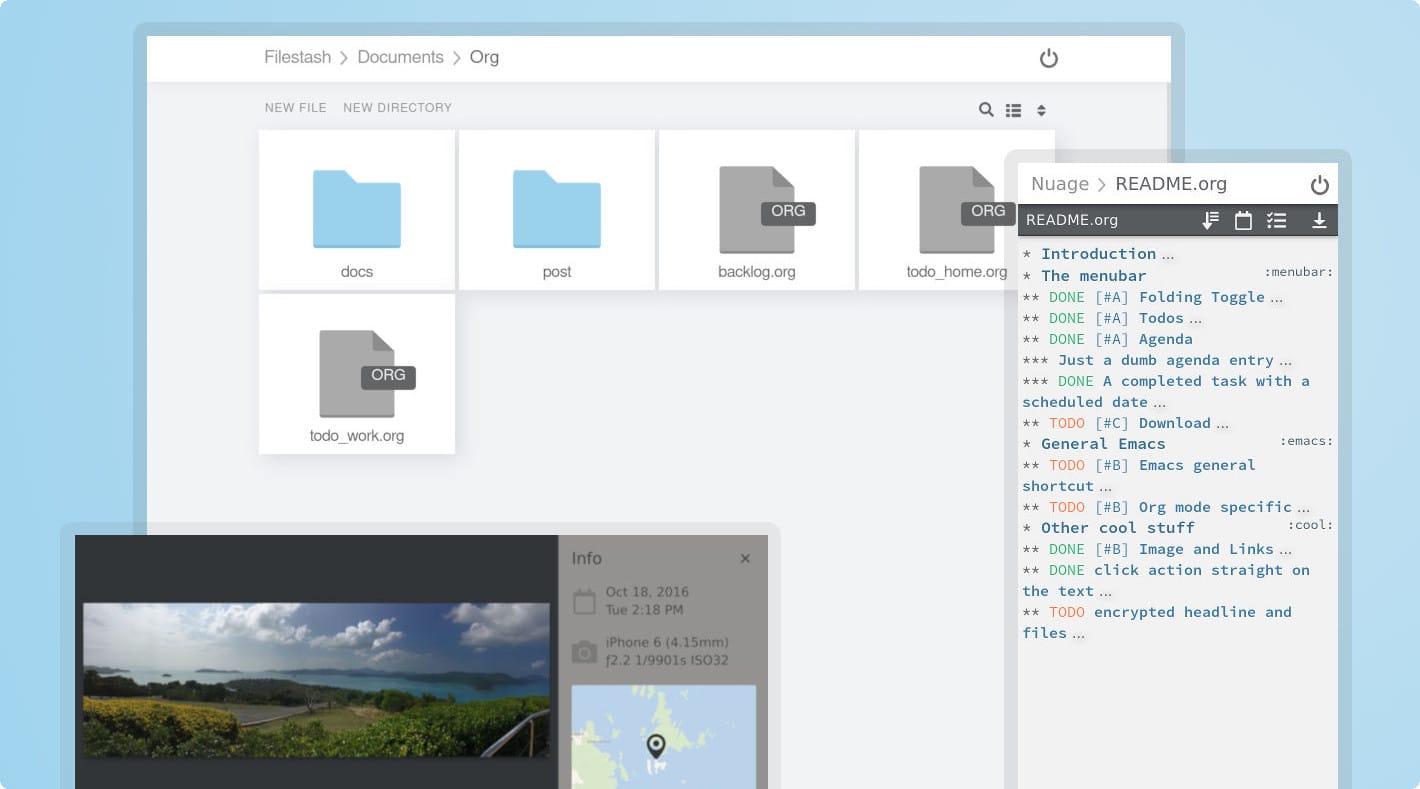
Filestash is a self-hosted web-based file client that supports multiple storage backends, it supports Amazon S3 out of the box.
It is easy to install, use and configure. It can also be used as a cloud file backup portal for individuals and enterprise.
mickael-kerjean23- Cloud Filer
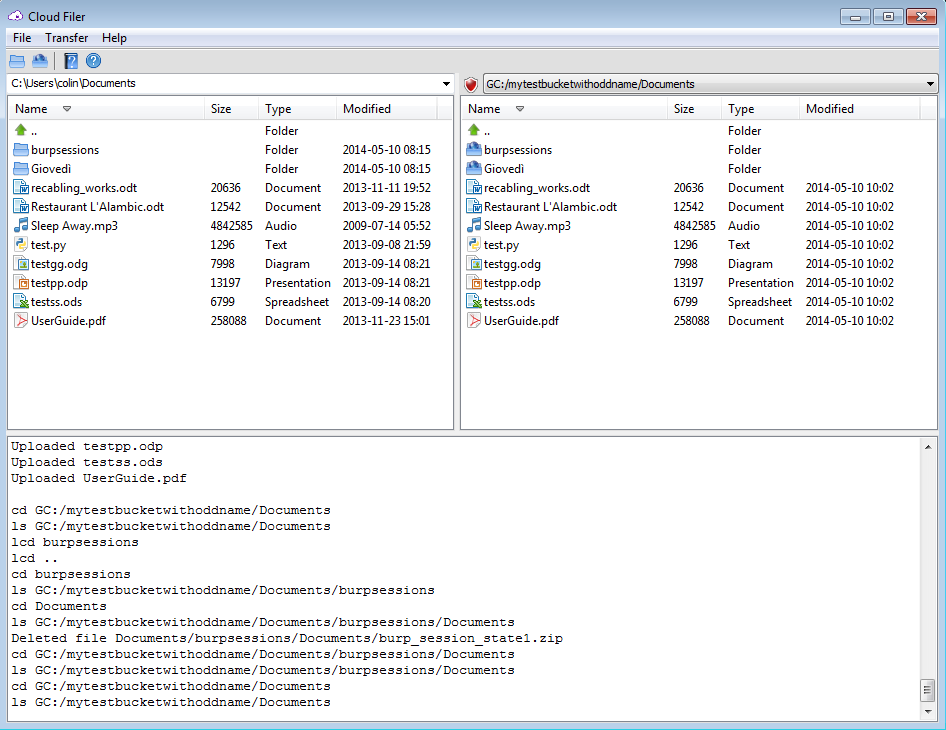
Cloud Filer is a graphical cloud file management tool and AWS S3 client. Cloud Filer allows you to upload and download files to cloud storage and can be used as part of your backup strategy.
Cloud Filer includes pre-internet encryption and file name obfuscation making access to your cloud data useless without the right password.
Looking for more File Managers?
Checkout our Archive!
 Hazem Abbas
 Hazem Abbas
 Hazem Abbas