Chaterm: AI Terminal with Voice Commands & Smart Completion, Learn How It Saves Devs Hours
Stop installing shells and plugins. Chaterm brings visual Vim editing, global syntax highlighting, AI-powered suggestions, and zero-trust security — all in one open-source terminal. Perfect for devs who want power without the setup.

If you’ve ever stared at a terminal full of cryptic error messages, spent 20 minutes debugging a one-liner grep command, or wished you could just talk to your server instead of memorizing 50 different awk patterns, welcome to the future.
What is Chaterm?
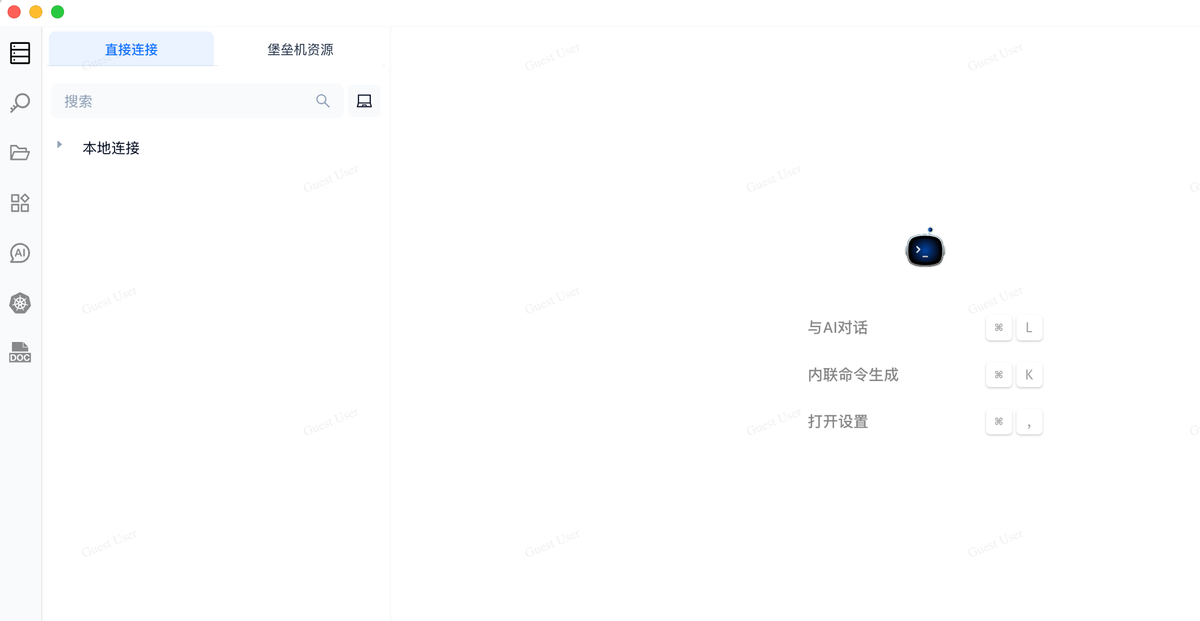
Say hey, to Chaterm, the open-source AI terminal client that’s redefining how developers interact with their systems. It’s not just another terminal wrapper, it’s your AI co-pilot for the command line, packed with intelligence, elegance, and zero friction.
 Hazem Abbas
Why Chaterm? Because Your Brain Shouldn’t Be a Memory Cache
Let’s get real: every developer has been there.
“Wait… was itrsync -avzorrsync -azv? And why does this SSH key keep failing?”
Instead of digging through man pages or Stack Overflow at 2 a.m., Chaterm lets you speak to your machine in plain English:
"Show me all failed login attempts from the last hour on the production server."
Boom. Done. No need to remember journalctl, fail2ban, or awk '/Failed/ {print $1}'. Just ask.
That’s the power of the AI Agent built into Chaterm, it understands natural language, interprets context, and translates your intent into precise, safe commands across Linux, macOS, Windows, and even legacy systems.
Use Cases That Make You Go “Wait… I Didn’t Have to Do That?”
Here’s how Chaterm transforms real-world dev workflows:
Debugging Like a Pro
- Stuck with massive log output?
→ “Find the top 5 errors in/var/log/app.logand show me the stack trace.” - Chaterm parses logs, filters noise, highlights root causes, no more blind scrolling.
Infrastructure Management at Scale
- Need to restart services across 50 servers?
→ “Restart nginx on all staging hosts.” - Chaterm uses its global knowledge base to execute the right command per OS (
systemctl,service, etc.), no copy-paste chaos.
No More SSH Key Stress
- Tired of rotating certs every month?
→ Zero Trust security means you never store passwords. Chaterm handles authentication securely via token-based access, no more password fatigue.
Write Code Faster, Without Leaving the Terminal
- Editing config files?
→ Use the Visual Vim Editor, a beautiful, mouse-friendly interface inside your terminal that feels like Sublime Text but runs invim. - Want syntax highlighting for JSON, YAML, Bash, Python?
→ Global Syntax Highlighting works instantly, regardless of shell (Zsh, Fish, Bash, etc.).
Voice Commands? Yes, Really.
- Hands busy? Headphones on?
→ Just say: “Deploy the latest build to prod.”
Chaterm listens, verifies context, and executes safely. High-accuracy speech recognition + secure KB = magic.
Team Collaboration Made Easy
- Working in a team?
→ Use IAM & Workspaces to manage roles, isolate environments, and track who did what. - Every action is logged and auditable, perfect for compliance and post-mortems.
 Hazem Abbas
Why This Matters for Developers
We’re not just adding bells and whistles. We’re solving real pain points:
| Problem | Chaterm Solution |
|---|---|
| Memorizing complex CLI syntax | Natural language + smart completion |
| Time wasted on repetitive tasks | Global aliases & AI automation |
| Security fatigue (SSH keys, passwords) | Zero Trust + encrypted auth |
| Inconsistent tooling across teams | Unified, cross-platform experience |
| Debugging nightmares | AI-powered log analysis & filtering |
It’s like giving every developer a personal SRE assistant — without hiring one.
Built with Privacy & Security in Mind
Chaterm doesn’t compromise on trust:
- Zero Knowledge Proof: Your data is encrypted end-to-end — even we can’t see it.
- Privacy Watermarking: Screen recordings, clipboard, and data transmission are protected.
- Behavior Audits: Detects anomalies (like accidental
rm -rf /) and alerts you before disaster strikes.
This isn’t just a convenience tool, it’s enterprise-grade security wrapped in a developer-first UI.
🛠️ How to Try It (It’s Free & Open Source)
npm install
npm run dev
Yes, really. One click. No setup. No plugins. No configuration hell.
And yes, it’s open source. So you can audit it, contribute to it, or even deploy it privately in your org.
What did the developer forget?

Languages, All app is in not in English, unless you know Chinese so you can switch the language.
Final Thought: The Terminal Just Got Smarter
Chaterm isn’t about replacing developers. It’s about amplifying them.
Imagine spending less time remembering syntax, and more time building, innovating, and shipping.
With AI agents, voice input, visual editing, and rock-solid security, Chaterm turns your terminal from a chore into a joy.
You don’t need to learn 100 commands. You just need to know what you want.
So go ahead, talk to your server. Let the AI do the typing.
Welcome to the next generation of terminal UX.
Welcome to Chaterm.
👉 Get Started Now – Open Source on GitHub
 chaterm
P.S. If you're tired of being the "terminal wizard" in your team… Chaterm will make you the hero. 😎