How to Build a Custom Personal Website with the Help of AI

AI tools make it possible to build and launch a professional-looking website in a few hours, even if you’ve never designed one before. Whether you need an online portfolio, a small business site, or a digital CV, here’s a step-by-step guide to getting started.
1. Register a Domain
Your domain name is your website’s online address. Choose one that’s short, easy to remember, and closely related to your name, brand, or area of expertise. If it’s for a business, try to include a relevant keyword (bakery, repair service, clinic, etc)—but don’t force it.
Choosing the Domain Extension
The domain extension is the part that comes after the dot, such as .COM, .ORG, or .NET. While search engines don’t rank websites higher based on the domain zone alone, a meaningful extension can still make a difference, directly and indirectly.
Industry-specific options like .DESIGN, .STUDIO, or .TECH can make your site more recognizable, while .ME is generally suited for any website that wants a personal and authentic touch. For personal and portfolio websites, the .ME domain extension is a popular and versatile choice, it helps make your site memorable and emphasizes individuality.
Before registering, research which extensions your competitors use and analyze their website traffic using online tools. This can guide your decision on whether to follow a trend or choose something unique. For instance, in the Gulf region .ME is popular both because of its individuality and as an abbreviation for the Middle East, making it appealing as a local extension.
 Hazem Abbas
2. Establish Your Goals
Before creating your website, define what you want it to achieve. Your goals will influence the site’s structure, content, and AI prompt. Common purposes include:
- Building brand awareness
- Improving SEO visibility for your business
- Connecting with customers or employers
- Showcasing your portfolio or personal projects
- Running an online shop or taking orders
Having a clear goal will help you communicate effectively with the AI builder. The more specific your description, the better the results.
3. Use AI to Create a Website
AI website builders can transform a short text prompt into a fully functional site. Start by drafting a detailed prompt that tells the AI what you want.
Example prompt:
“Create a website for my dental clinic HealthyTeethFor.Me. Use light blue and white colors, keep the tone friendly and professional, and include sections for services, team members, prices, reviews, and a contact form with a phone number and email.”
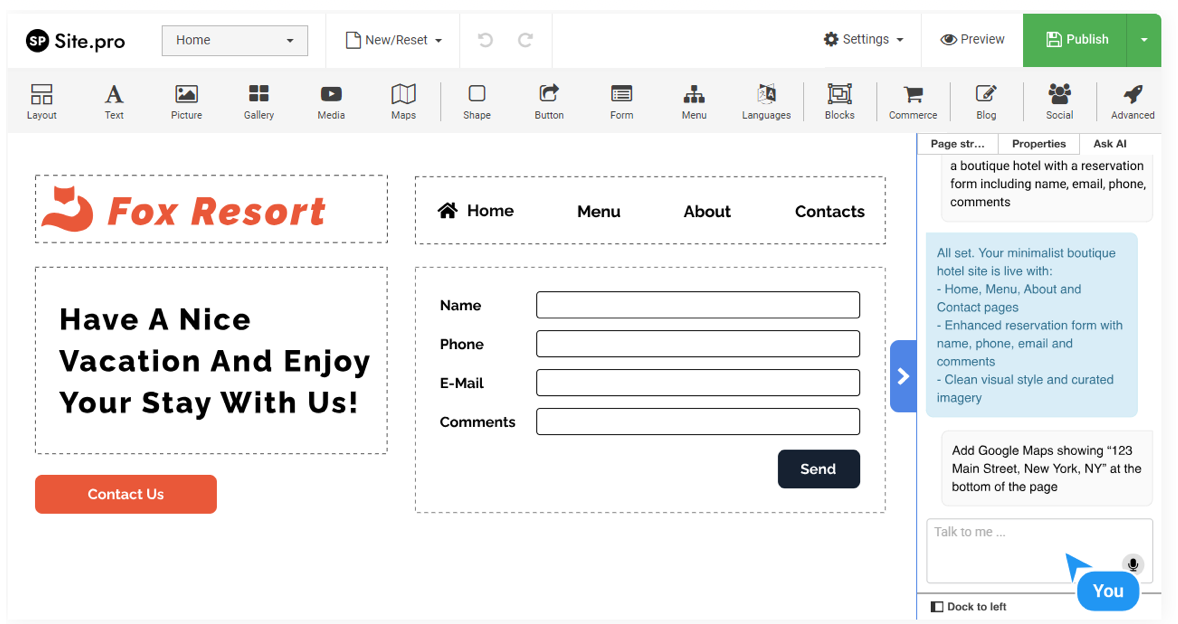
Different kinds of AI website builders have their own approaches when it comes to AI generation. For example, Site.pro can take this kind of prompt and automatically generate your website layout, design, and initial content. The AI may even update you as it builds, telling which sections are in progress.
 Hazem Abbas
Once the generation is done, you’ll have a functional and mobile-responsive website filled with relevant text and visuals. You can further personalize it by editing text, uploading your own images, or changing colors and fonts. Site.pro allows you to edit using an AI chatbot—just type or say commands like “move the contact form higher” or “add a testimonials section.” If you prefer full manual control, you can adjust everything directly within the editor.
4. Connect Your Domain
You can buy and connect your domain either directly through the website builder or from your user dashboard (“My Websites” on Site.pro). Purchasing your domain early ensures it isn’t taken by someone else.
After your site is ready, link it to your chosen domain to make it publicly accessible—your personal or business brand will now have a professional online home.
Extra Tips for Small Business and Personal Websites
- Add your business to Google Maps if you have a physical location. It improves visibility and makes it easier for customers to find you.
- Optimize SEO settings—titles, meta descriptions, and keywords. AI tools in builders like Site.pro can generate these automatically, but reviewing them manually ensures accuracy.
- Use descriptive alt text for images. This improves accessibility for visitors using screen readers and helps search engines understand your content.
- Keep your content updated. Regularly posting news, projects, or articles signals that your website is active and trustworthy.
Conclusion
With AI-driven builders, anyone can design and publish a professional, mobile-friendly site in less than an hour.
Start by choosing a memorable domain—.ME works especially well for personal projects—then use an intuitive platform like Site.pro to bring your ideas to life. With clear goals and a few simple AI prompts, your website can quickly become an effective tool for personal branding, communication, and growth.