How To Run Private Clinical AI On Your Own Hardware Using OpenMed

Almost all modern healthcare institutions are using cloud-based medical APIs by default to enable clinical text analysis and patient data processing. These are proprietary, closed-source services that require sending sensitive Protected Health Information (PHI) to third-party vendors. They are used because they offer powerful Natural Language Processing (NLP) capabilities without the need for local infrastructure.
While these cloud services are convenient, they introduce significant privacy risks and ongoing costs. You can still choose to process your clinical data entirely on your own hardware with a tool of your liking. The open-source community has developed OpenMed, a comprehensive suite that runs over 1,500 specialized biomedical models locally. All you have to do is install OpenMed and point it at your clinical text.
 Hamza Musa
What Is OpenMed?
OpenMed is an open-source, local-first healthcare AI platform designed to extract biomedical entities and remove PHI entirely on the hardware you control. It supports over 1,500 curated models for tasks ranging from disease detection to anatomy identification. Unlike cloud APIs, OpenMed ensures that patient data never leaves your device or network, making it ideal for HIPAA-compliant environments, air-gapped servers, and privacy-conscious clinics.
Install OpenMed!
The steps you should follow are below:
- Install OpenMed using Python’s package manager, choosing the backend that matches your hardware.
• For standard CPU or NVIDIA GPU setups, runpip install "openmed[hf]"to get the core Hugging Face runtime.
• If you are running on Apple Silicon (M1/M2/M3 Macs), usepip install "openmed[mlx]"to leverage the MLX framework for up to 33x faster inference.
• To run a REST API service for integration with other hospital systems, install the service extra withpip install "openmed[hf,service]". - Configure your model selection based on your specific clinical needs.
• OpenMed does not use a single monolithic model. Instead, it offers specialized models for different tasks. Usedisease_detection_superclinicalfor identifying conditions,pharma_detection_superclinicalfor medication extraction, orpii_superclinical_largefor de-identification.
• You can also run models offline in air-gapped environments by downloading the model weights to a local directory and pointing themodel_idparameter to that path. This ensures no data ever contacts the Hugging Face Hub or any external server. - Integrate OpenMed into your workflow using the Python API, Swift Kit, or REST service.
• For Python scripts, use theanalyze_textfunction to extract entities like diseases and drugs from clinical notes instantly.
• For iOS and macOS apps, integrate OpenMedKit via Swift Package Manager to run PII detection and clinical extraction directly on iPhones and iPads without any network connection.
• For browser-based tools, use the Transformers.js export to run token classification directly in the user’s browser using WebGPU. - Run your analysis and you should see structured, de-identified insights returned immediately:
There are lots of specialized medical models that you can choose between in the OpenMed registry. Check them out if you would like to tailor the AI to your specific medical specialty further. You can also play with the confidence thresholds and privacy filters to change the way it handles sensitive data to your institutional taste.
How Does It Work?
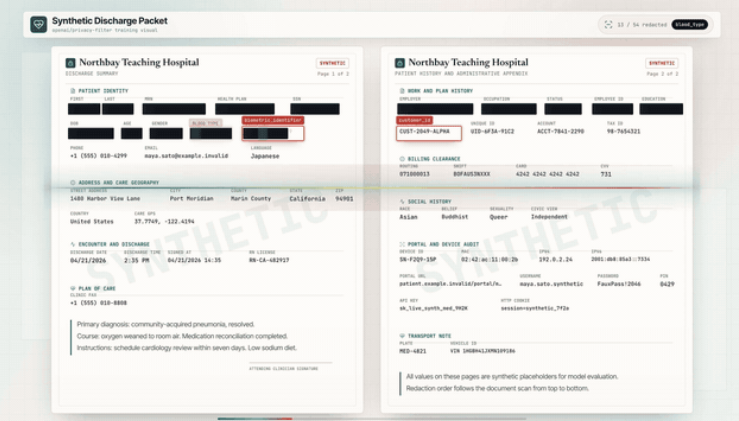
OpenMed uses state-of-the-art Transformer models adapted for the biomedical domain. It processes clinical text through specialized pipelines that identify entities such as diseases, drugs, genes, and personal identifiers. For privacy, it employs a "Privacy Filter" architecture that supports 17 languages and over 600 PII checkpoints.
It can mask, replace, hash, or shift dates in real-time, ensuring that sensitive information is obfuscated before it is stored or shared. On Apple Silicon, it utilizes the MLX framework to accelerate these computations significantly compared to traditional CPU-based PyTorch runs.
 Hamza Musa
Key Features and Benefits
- 100% On-Device Processing: No data is uploaded to the cloud. This eliminates vendor lock-in and reduces liability associated with data breaches.
- Cross-Platform Support: Runs on Linux, Windows, macOS, iOS, Android, and even in the browser via WebGPU.
- Specialized Medical Models: Access to over 1,500 models trained on public biomedical datasets, often outperforming general-purpose LLMs in clinical accuracy.
- HIPAA-Aware De-identification: Automatically detects and removes all 18 Safe Harbor identifiers, including names, dates, SSNs, and medical record numbers.
- Cost-Effective: Free and open-source under the Apache-2.0 license, eliminating per-call API fees.
Why Use OpenMed?
The primary benefit of OpenMed is sovereignty. By keeping data local, healthcare providers maintain full control over their patient information. This is crucial for compliance with regulations like HIPAA and GDPR. Additionally, the performance gains on modern hardware, especially Apple Silicon, make local processing faster and more reliable than waiting for cloud API responses.
Whether you are building a mobile app for doctors or a secure server for hospital records, OpenMed provides the tools to do so without compromising on privacy or cost.
Source-code & Downloads
 maziyarpanahi