
Puter.js: The Missing piece of AI Coding. (Guest Post by: Reynaldi Chernando)

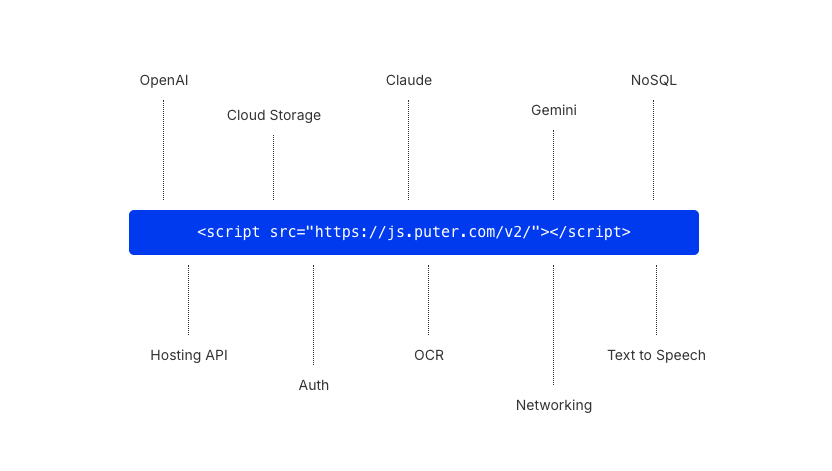
Most backends for vibe coding still expect you to create an account, spin up a project, copy API keys, configure a client, and read a few pages of docs before anything actually runs. That setup friction was always annoying, especially in a workflow where the coding itself is automated.
The AI writes your entire app in one shot, and then everything stops because you have to go grab a database URL, an OpenAI key, and paste secrets into an .env file. The coding is automated, but the plumbing isn't. The human became the bottleneck.
Puter.js removes that bottleneck entirely.
What is Puter.js?
Puter.js gives your app auth, cloud storage, a database, AI models, hosting, and more, all from a single JavaScript library. No infrastructure to set up, and no API keys at all.
You add one library, and your frontend suddenly has a full backend:
<script src="https://js.puter.com/v2/"></script>or via npm:
npm install @heyputer/puter.jsThen:
import { puter } from '@heyputer/puter.js';That's the whole setup. Because there is nothing to configure, an AI coding agent can generate a complete, working full-stack app in a single prompt, no pausing to ask you for credentials, no backend code for you to deploy afterwards. You ask for a to-do app, and thirty seconds later you have a to-do app with sign-in, cloud-synced data, and AI features, running.
And while it's built with AI-generated apps in mind, nothing about it is AI-only. It works with any framework (React, Next.js, Vue, Svelte, Angular, Astro), and the same qualities that make it easy for a language model to use, a small consistent API and zero configuration, make it just as pleasant for developers writing every line by hand.
Why it works so well for vibe coding
- Zero infrastructure setup: The AI writes the app, you open it in a browser, and it works. No going back and forth between your agent, a cloud dashboard, and a terminal. No "now go to the console and create a project" step in the middle of your flow.
- One-shot friendly: Since there are no credentials to request and no backend to deploy, the agent never has to stop and hand control back to you. The gap between "prompt sent" and "app running" collapses to a single step.
- The User-Pays model: Each authenticated user brings their own allocated resources (storage, database, AI credits), so your app taps into their account, not yours. Whether you have one user or a million, your infrastructure bill is $0.
- Made for AI coding: The API is small and consistent, so language models use it correctly instead of hallucinating half a config file. Puter even publishes an llms.txt so any agent can read the entire API in one request, and an MCP server for agents that support it. It works with Claude Code, Codex, Cursor, Copilot, Lovable, Bolt, v0, whatever you already use. There's no plugin to install either; you just tell your agent to use Puter.js.
No API keys means nothing to leak
Security deserves its own section here, because it's where AI-generated apps usually fall apart.
AI-generated code has a bad habit of putting secrets where they don't belong. An agent building a chatbot will happily paste your OpenAI key into frontend JavaScript, where anyone can open DevTools and walk away with it. Even when the key ends up server-side, you're now maintaining a backend whose main job is to handle a credential.
Puter.js avoids the whole category of problem: there are no API keys anywhere, not in your frontend, not in your backend, because there is no key to begin with. There's nothing to leak, steal, or rotate. Instead, every request is authenticated as the signed-in user and scoped to their permissions, with sandboxing, rate-limiting, and anti-abuse handled by the platform. Your app talks to Puter, Puter verifies who's asking, and the response comes back. Bot traffic, credential stuffing, and abuse are Puter's problem to filter, not yours to code around.
For vibe coding specifically, this closes off one of the most common failure modes: the AI can't leak a secret that doesn't exist.
The User-Pays model
This part changes the economics of shipping apps, so it's worth explaining properly.
In the traditional model, you pay for your users. Every signup adds to your storage bill, every AI call adds to your API bill, and a post that goes viral is as much a financial event as a happy one. That's why so many side projects never ship: the developer doesn't want to be on the hook for strangers' usage.
Puter flips it. Here's how it works:
- Every user, once signed in, has their own allocated resources, storage, database, AI credits, as part of their Puter account.
- Your app taps into the user's resources rather than requiring its own infrastructure.
- If a user exceeds their allowance, they pay for their own usage.
- You, the developer, pay $0 for infrastructure, regardless of user count.
The side effect is that abuse loses its incentive too: a bad actor hammering your app is spending their own allowance, not draining your wallet. Your app can go from one user to a million without your costs moving at all.
Features
Beyond the vibe-coding angle, Puter.js is a complete backend SDK:
- Authentication: Sign-in and user accounts out of the box, no auth provider to configure, no session handling to write.
- Cloud storage: A scalable file system for your app, think S3 without the setup. Read, write, upload, and organize files that live in each user's cloud.
- Database: A fast, serverless NoSQL key-value store, ready instantly, with atomic operations like increment and decrement built in.
- AI Gateway: One API for 500+ models from OpenAI, Claude, Gemini, Grok, DeepSeek, and more, plus image generation, video generation, text-to-speech, speech-to-text, and OCR. Switching models is changing a string, not an integration.
- Hosting: Publish static sites directly from your code, your app can deploy other apps.
- Serverless Workers: Run backend logic on demand with zero infrastructure, for the cases where you do want server-side code.
- Networking: Actual TCP/IP from the browser.
- Peer: Real-time communication between users, for chat, presence, and multiplayer features.
How does it work?
This is where it clicks. Here's a full AI chat call:
puter.ai.chat("Explain quantum computing in one sentence")
  .then(reply => puter.print(reply));
Want a different model? Change one string:
puter.ai.chat("Write a haiku about databases", { model: "claude-sonnet-5" })
  .then(reply => puter.print(reply));
Saving data to the cloud:
await puter.kv.set("theme", "dark");
const theme = await puter.kv.get("theme");
Writing a file to the user's cloud storage:
await puter.fs.write("notes.txt", "Hello from Puter!");
Signing a user in:
const user = await puter.auth.signIn();
puter.print(`Welcome, ${user.username}!`);
Generating an image:
const image = await puter.ai.txt2img("a cat wearing sunglasses");
document.body.appendChild(image);
Notice what's not here: no keys, no client initialization, no backend endpoint, no deployment step. Every call looks like the last one, which is exactly why AI agents rarely get it wrong, and why humans writing code by hand will enjoy it just as much.
The invisible work between "the code is written" and "the app is live" is where most projects stall. Puter.js compresses that gap to basically zero. If you've ever watched your AI agent produce a beautiful app that you then spent an hour wiring up, this is the layer that was missing.
Getting started
If you're vibe coding, open your agent of choice and include one line in your prompt:
use Puter.js (more info if needed: https://docs.puter.com/llms.txt)
That's enough for the agent to pull the full API reference and build against it. Ask it for a to-do app, a chatbot, a note-taking tool with cloud sync, whatever you have in mind, and the result should run as-is, no follow-up configuration.
If you're coding by hand, drop the script tag into an HTML file and start calling puter.* functions; the documentation covers every method with runnable examples, and there's a browser playground if you want to poke at the API before committing to anything.
Either way, the first working app is minutes away, and that's really the whole point.
Resources & Downloads


Author:
Reynaldi Chernando