Stop Hoarding Courses, Start Mastering Them: The Student’s Ultimate OS for Digital Learning

We’ve all been there. You buy a top-tier course on Udemy or Hotmart during a flash sale. You download a dozen PDFs that promise to turn you into a Senior Engineer or a master of Game Design. Then, life happens. Those files sit in a dusty "Learning" folder on your hard drive, unorganized, unplayed, and unread.
The problem isn't your ambition; it's your environment. Switching between a browser tab, a PDF viewer, a separate note-taking app, and a Pomodoro timer is a friction nightmare.
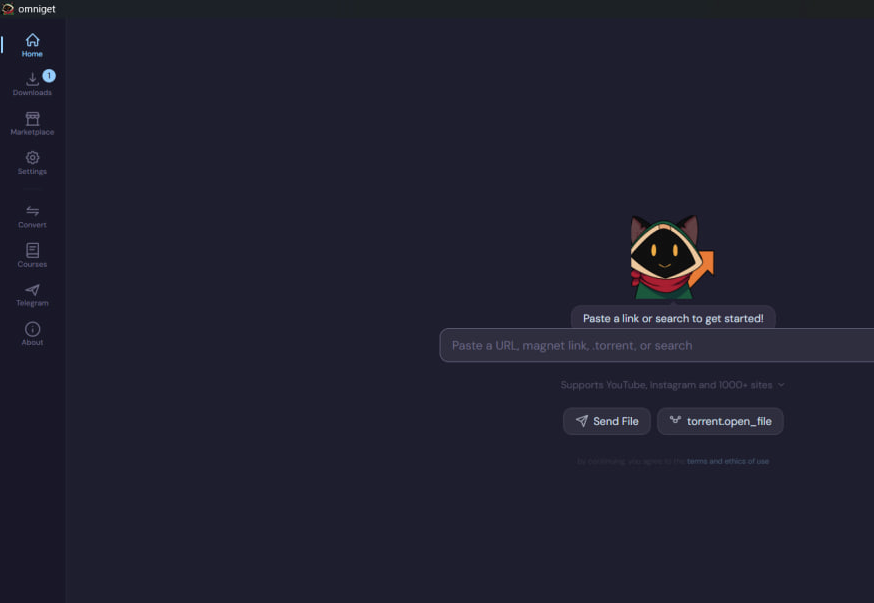
What is OmniGet?
It’s a free, open-source desktop powerhouse that bridges the gap between "having the content" and "owning the knowledge." It’s not just a downloader; it’s a dedicated operating system for students who actually want to finish what they start.
The End of Tab-Hell: A Course Player Designed for Focus
Most downloaders give you a folder full of raw .mp4 files and leave you to fend for yourself. OmniGet is different. It takes those files and reconstructs them into a high-end educational interface.
Whether you are pulling from Hotmart, Udemy, Kiwify, Skool, or Teachable, OmniGet builds a local library complete with covers and progress tracking. Once you’re inside a lesson, the experience is surgically precise.
The video player supports speeds from 0.5× to 2×, but the real magic is in the Timestamped Notes. While watching a complex lecture on Agentic Engineering, you can hit a shortcut, type a note, and it’s pinned to that exact second. Next week, when you’re reviewing, clicking that note jumps the video right back to the explanation you needed. No more scrubbing through a three-hour video to find that one specific diagram.
Even better? It displays the course description and any included attachments—PDFs, code snippets, or images, side-by-side with the video. You never have to minimize your player to check a reference file.
A Document Reader That Respects Your Eyes (and Your Files)
If you’re a student who learns through deep reading, OmniGet replaces the need for clunky PDF viewers or online converters. It handles PDF, EPUB, CBZ, and even Manga formats with a local-first philosophy. Nothing is ever uploaded to a cloud; it stays on your machine.
The reader features a "Focus Mode" that strips away the interface, leaving only you and the text. For those late-night sessions, you can toggle between Sepia, Dark mode, or an "e-ink" filter that mimics paper.
One of my favorite subtle features is the Cursor Line Guide. For dyslexic students or anyone tackling dense technical manuals, this guide follows your mouse to keep your eyes on the right line. Combined with the session timer, you can track exactly how many minutes you spent in deep work each day, visualized on a GitHub-style heatmap.
The "Download Once, Own Forever" Philosophy
The web is fragile. Links break, subscriptions expire, and platforms change their terms. OmniGet is built for the student who wants to own their education.
Using the same engine as the legendary yt-dlp, OmniGet supports downloads from roughly a thousand sites—including YouTube, Instagram, TikTok, and even Torrents. You paste a link, pick your quality, and the file lives on your computer.
For many, the Global Hotkey (Ctrl+Shift+D) is the game-changer. You can be browsing a technical thread on X (Twitter) or a project on GitHub, copy the URL, hit the hotkey, and OmniGet handles the download in the background without you ever having to switch windows.
Beyond Consumption: The Science of Learning
OmniGet doesn’t stop at playing videos and opening books. It incorporates actual learning science:
- Spaced Repetition Flashcards: It uses the SM2 algorithm (the same one behind Anki) to help you memorize what you study. You can even import your existing
.apkgfiles. - Knowledge Graphing: The built-in notes app supports bidirectional links. If you’re studying "Neural Networks" in a course and mention "Python," OmniGet helps you map those connections across different subjects.
- Pomodoro Integration: A focus timer is baked into the UI. When your session ends, it automatically pauses your video player, forcing you to take that necessary brain break.
Features
Learning Management & Course Integration
- Supported Platforms: Download and organize courses from Hotmart, Udemy, Kiwify, Skool, Teachable, and several other platforms.
- Integrated Video Player: Features playback speeds from 0.5× to 2×, auto-resume, and keyboard shortcuts.
- Timestamped Notes: Pin Markdown-supported notes to specific video seconds to jump back instantly.
- Side-by-Side Study: View course attachments (PDFs, images, code) alongside lesson videos.
- Course Library: Automated progress tracking, covers, status filters, and custom tags for organization.
Advanced Document Reader
- Universal Formats: Built-in reader for PDF, EPUB, CBZ, TXT, and HTML.
- Study Tools: Supports highlights, bookmarks, and side-panel Markdown notes.
- Reading Modes: Choose between paged or scroll views, including a dedicated Manga mode for CBZ files.
- Focus Features: Focus mode for distraction-free reading and a cursor line guide for enhanced tracking.
- Metadata Lookup: Automated ISBN lookup for author, publisher, and high-quality covers.
Downloader & Utility Suite
- Versatile Downloader: Supports YouTube, TikTok, Instagram, and roughly 1,000 other sites via yt-dlp.
- Direct Downloads: Global hotkey (Ctrl+Shift+D) and browser extensions for instant background downloads.
- File Management: Built-in support for Torrents, P2P transfers, and local FFmpeg file conversion.
- Social Integration: A Telegram chat browser to save media and files directly from chats.
Productivity & Customization
- Scientific Learning: Includes spaced repetition flashcards using the SM2 (Anki) algorithm.
- Focus Tools: Integrated Pomodoro timer that automatically pauses video playback.
- Personalized UI: 14 themes (including Catppuccin and Dracula) and support for 8 languages.
- Privacy-First: All files, annotations, and progress are stored in a local SQLite database with zero cloud uploads.
Why Open Source Matters for Students
In an era of "Software as a Service" where every feature requires a login and a credit card, OmniGet is a breath of fresh air. It’s portable (no setup required), works across Windows, Linux, and macOS, and stores everything in a local SQLite database.
Your progress, your highlights, and your timestamped notes belong to you. If you move your course folder to an external drive, OmniGet's "Health Check" feature helps you relink the files without losing your data.
Final Thoughts
OmniGet is the tool I wish I had when I started my journey into software development. It turns a chaotic mess of downloads into a professional learning laboratory. It’s for the student who is tired of the friction and ready to turn their computer into a true machine for mastery.
Stop staring at your downloads folder. Put it in OmniGet and start learning.
Get OmniGet Here (or wherever you find your open-source gems).
 tonhowtf