
The Frontend Monolith is Dead: Why Micro Frontends are the Cure for Enterprise Scalability


I’ve been writing JavaScript for over 20 years. I remember the days of jQuery spaghetti, the birth of Backbone.js, and the "Great Framework Wars" that brought us the titans we use today like React, Vue, and Angular. Most of my career has been spent in the trenches of healthcare technology and industrial automation, sectors where software isn't just a product; it’s a mission-critical utility.
In these fields, we’ve perfected the art of the backend. We broke our monolithic APIs into microservices years ago to handle the sheer scale of medical records and real-time automation data. But for a long time, we made a classic mistake: we kept our frontends as massive, bloated monoliths.
If your backend is a sleek fleet of specialized ships but your frontend is a single, lumbering Titanic, you’re headed for an iceberg. It’s time to talk about the missing piece of the puzzle: Micro Frontends (MFE).
What Exactly is a Micro Frontend?
Think about a massive healthcare platform. You have a module for Electronic Health Records (EHR), a portal for Patient Scheduling, and a complex Billing Engine. In a traditional monolith, if a developer makes a CSS tweak in the Billing section, the entire EHR module might need to be re-tested and re-deployed. That’s a bottleneck.
Micro Frontend architecture breaks the UI into small, independent, and self-contained modules. Instead of one giant application, you are building multiple small apps that are owned by different teams and focused on specific business domains.
 Hazem Abbas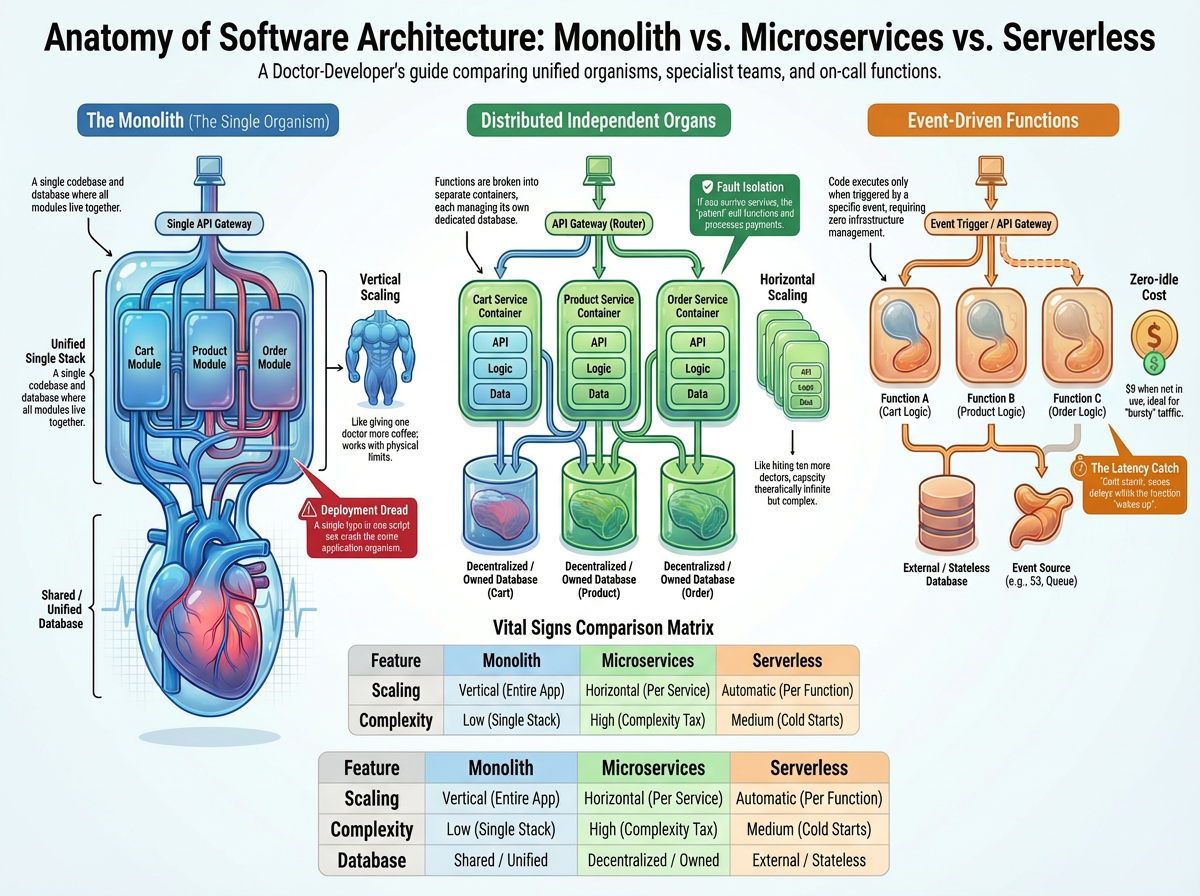
The Shift from Monolith to Micro
In a monolith, everything is tightly coupled. One version of React, one massive Webpack config, and one long deployment pipeline. With Micro Frontends, you treat your UI like a collection of features that live together but grow separately.
- Independent Development: The team working on the "Patient Chart" doesn't need to know what the "Insurance Verification" team is doing.
- Independent Deployment: You can push an update to the "Pharmacy Integration" without touching the rest of the site.
- Technology Agnostic: This is the kicker. You can have a legacy module in Angular while your new features are built in Next.js.
 Hazem Abbas
How the Micro Frontend Magic Happens
When a user visits your app, they shouldn't see the seams. To them, it looks like one cohesive experience. But under the hood, a Shell Application (or Container) is doing the heavy lifting.
1. The Shell App (The Orchestrator)
The Shell is the entry point. It handles global concerns like:
- User Authentication
- Navigation & Routing
- Global State Management (like the logged-in user's profile)
- Loading and Mounting MFE modules
2. The Micro Frontends (The Features)
These are the specialized modules. In an e-commerce context, your "Product Listing" might be React, your "Shopping Cart" might be Vue, and your "Checkout" could be Svelte. The Shell pulls these in dynamically as the user navigates.
Popular Approaches to Implementation
In my 20 years of JS, I've seen many "solutions" to this, but today we have three primary contenders:
1. Module Federation (The Modern Standard)
Introduced in Webpack 5, Module Federation is the gold standard. it allows a JavaScript application to dynamically load code from another application at runtime. It’s fast, shares dependencies (so you don't load React five times), and feels native to the JS ecosystem.
2. Single-SPA
This is a powerful framework that orchestrates multiple frontend applications on the same page. It’s great for migrating legacy apps because it allows you to co-exist different frameworks seamlessly.
3. iFrames (The "Old School" Reliable)
Don't laugh! In highly secure automation environments or legacy healthcare systems where you need absolute isolation between modules to prevent one script from crashing another, iFrames still have a place. However, they are generally avoided in modern web apps due to poor UX and SEO challenges.
Why Healthcare and Automation Need This Now
Why am I so passionate about this for healthcare and automation? Because these industries can't afford "big bang" releases.
Independent Team Ownership
In a medical tech company, you might have a team of doctors advising the UI for the clinical side and a team of accountants advising the billing side. Micro Frontends allow these teams to "own" their respective features end-to-end. If the billing team wants to move to a new version of a library, they don't have to wait for the clinical team's approval.
Faster Releases & Reduced Risk
In automation, if I’m updating the "Robot Diagnostic Dashboard," I don't want to risk breaking the "Emergency Shutdown" UI. By isolating these into MFEs, the blast radius of a bug is significantly reduced. You can deploy the diagnostic update independently, ensuring the mission-critical systems remain untouched.
 Hazem Abbas
The Hidden Challenges (The "Catch")
I’ve been around long enough to know there’s no such thing as a free lunch. Micro Frontends come with significant overhead.
UI/UX Consistency
When different teams build different parts of the UI, you risk the app looking like a Frankenstein monster. To solve this, you must have a shared Design System or a shared Component Library (like an internal Tailwind or Material UI kit) that everyone adheres to.
Shared State Complexity
Communicating between a React MFE and a Vue MFE can be tricky. We usually solve this using Custom Events or a lightweight global state bus. Over-communicating between MFEs is a sign that your boundaries are drawn incorrectly.
Performance Overhead
If not managed correctly, you might end up loading multiple versions of the same library, leading to massive bundle sizes. Module Federation helps mitigate this, but it requires careful configuration.
When to Pull the Trigger (And When to Walk Away)
You SHOULD use Micro Frontends if:
- You have a large-scale application with dozens of pages and complex logic.
- You have multiple frontend teams (usually 3+) working on the same product.
- You need to scale frontend development without teams stepping on each other's toes.
- You are following Domain-Driven Design (DDD) on the backend and want the frontend to match.
You SHOULD NOT use Micro Frontends if:
- You are a small startup with a single team.
- You are building a simple dashboard or a CRUD app.
- Performance is the absolute #1 priority (e.g., a high-frequency trading UI).
- Your team isn't comfortable with complex CI/CD and DevOps. A clean monolithic frontend is almost always better than a poorly implemented Micro Frontend.
Best Practices from Two Decades in JavaScript
If you’re going down this path, keep these rules in mind:
- Define Clear Boundaries: Use business logic, not technical layers, to split your apps. "Search" is a domain; "Buttons" is not.
- Automate Everything: Each MFE needs its own independent CI/CD pipeline.
- Standardize Your Shared Contracts: Ensure that the way MFEs talk to the Shell is documented and versioned.
- Start Simple: Don't go full MFE on day one. Start with a Modular Monolith and split out your most "painful" feature first.
Final Thoughts: The Winning Combination
In the early 2000s, we were just happy if the browser didn't crash. Today, we are building "Operating Systems in the Browser."
If you’ve already adopted microservices on the backend but are still deploying a giant frontend monolith, you’ve only solved half the problem. You still have a deployment bottleneck, and you still have "too many cooks in the kitchen" syndrome.
Microservices + Micro Frontends = True Scalability.
It’s about team autonomy. It’s about being able to pivot quickly in a fast-moving market like healthcare or automation. It’s about building software that can grow as fast as your business does.
Are you ready to break the monolith? I’ve seen this transition save engineering departments from burnout and technical debt. It’s a journey, but for large-scale enterprise apps, it’s the only way forward.