Unlocking Creativity in ADHD Kids & Teens: How Open-Source Design Apps Became My Lifeline (And Yours Too!)


By Dr. Hamza M., MD | Developer | Open-Source Advocate | Hippotherapist | ADHD Warrior
Why I Chose Open Source, Because Boring Apps Don’t Work for ADHD Minds
As a medical doctor, developer, and someone who lives with ADHD, I’ve seen the struggle firsthand, not just in patients, but in my own son, friends, and kids I mentor. The world is full of apps that feel like homework: rigid, repetitive, and soulless. But then I discovered something powerful: open-source creative software isn't just free, it’s freedom.
I started introducing tools like Tux Paint, Inkscape, Blender, Goxel, MagicaVoxel, and Wings 3D to kids and teens with ADHD, (starting with my own kid) not as lessons, but as playgrounds.
In this creative space You don’t need permission to be wild. You just need a canvas. And guess what? They thrived.
Tux Paint: Where Fun Meets Focus (Even for Tiny Hands!)
When I first showed Tux Paint to my 3-year-old, he stared at the screen… then laughed. Not because it was funny — but because he could do anything. The cartoon penguin mascot, the sound effects, the instant feedback, it felt like magic.
What struck me? He didn’t get bored. He created. And when he made a “flying robot dragon,” he spent 45 minutes tweaking colors, adding sparkles, and narrating its backstory.
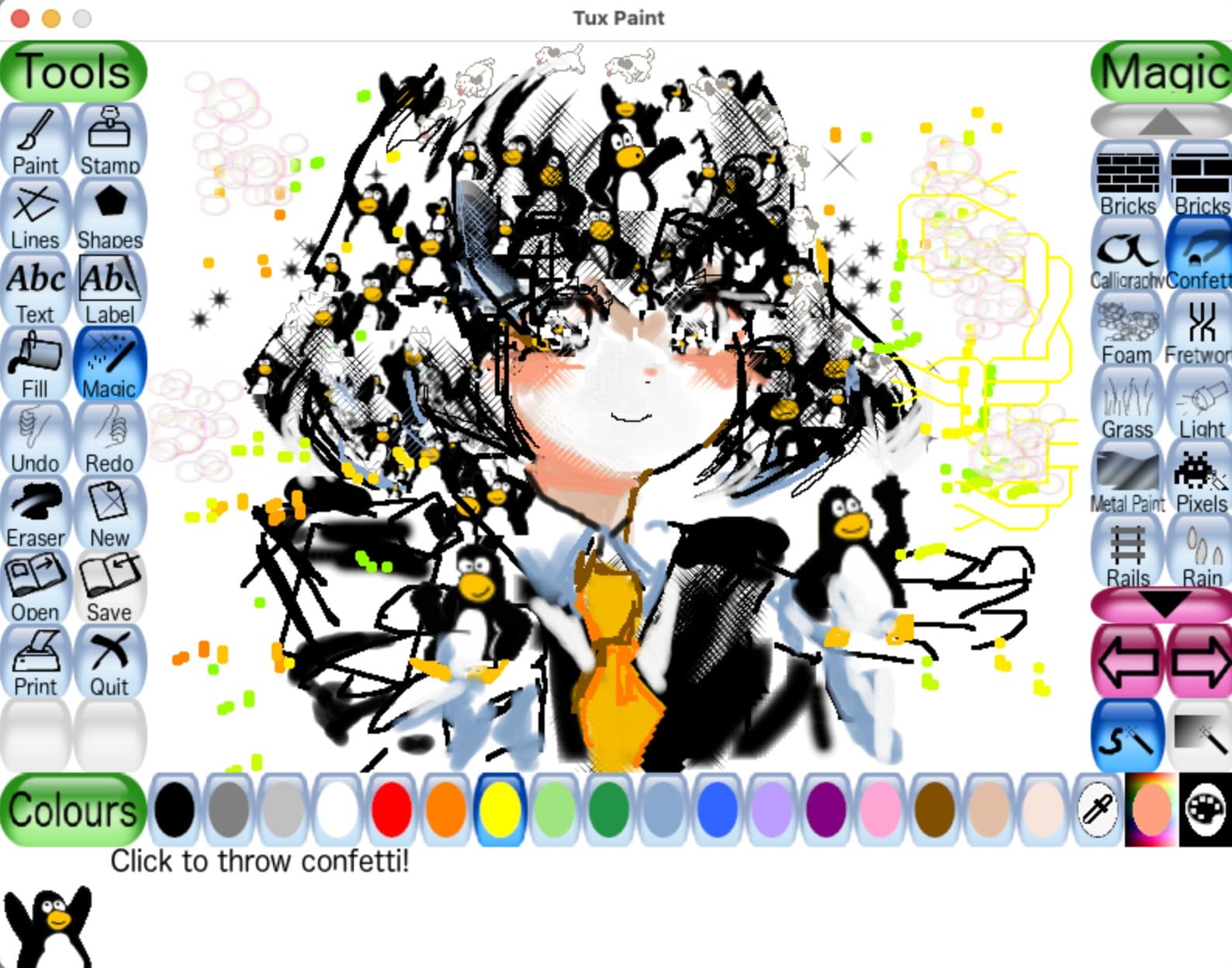
I remember having a heated discussion with a friend who doesn’t believe in open-source. He asked me, “What’s the best open-source app, in your opinion, that has made a real impact on science, education, and children’s growth?”
Without hesitation, I replied: Tux Paint, and then pointed to my son, who was just four years old, completely absorbed in creating magic on my MacBook.
The screen lit up with colors, sounds, and imagination, and he didn’t look up once. That moment said it all.
Why Tux Paint Works for ADHD Kids:
- Instant gratification (no waiting, no complex menus)
- Instant feedback
- Encouraging AI-like mascot (Tux) that guides without micromanaging
- Tools are intuitive: paintbrush, stamps, glow effects, music notes, even a "magic eraser"
- Perfect for preschoolers to 6th graders: ages 3–12 (Started with my son when he was 3)
- I would say gamified fancy interface
Pro Tip: Use the “Sound Effects” feature to turn every stroke into a tiny celebration. That dopamine hit? It keeps them engaged longer than any reward chart ever could.
Fractal Design: The ADHD Mind’s Secret Weapon for Focus & Flow

Years ago, during med school burnout, I stumbled upon fractal design apps, and it changed everything.
I used Apophysis, XaoS, Fragmentarium, and Ultra Fractal (all open-source or free-to-use) to generate mind-bending patterns. At first, I thought it was just art. Then I realized: this was therapy.

For people with ADHD, fractals are perfect. Why?
- They’re unpredictable yet structured, a sweet spot between chaos and order.
- Every tweak creates a new universe. No two results are alike.
- The brain loves pattern recognition, and fractals are pure pattern poetry.
One of my med-school friends said: “After 30 minutes of playing with fractal layers, I feel calm, focused, and ready to tackle my next rotation.” This isn’t just fun, it’s neurological reset mode.
Processing, and Why I always recommend it for Teens with ADHD!
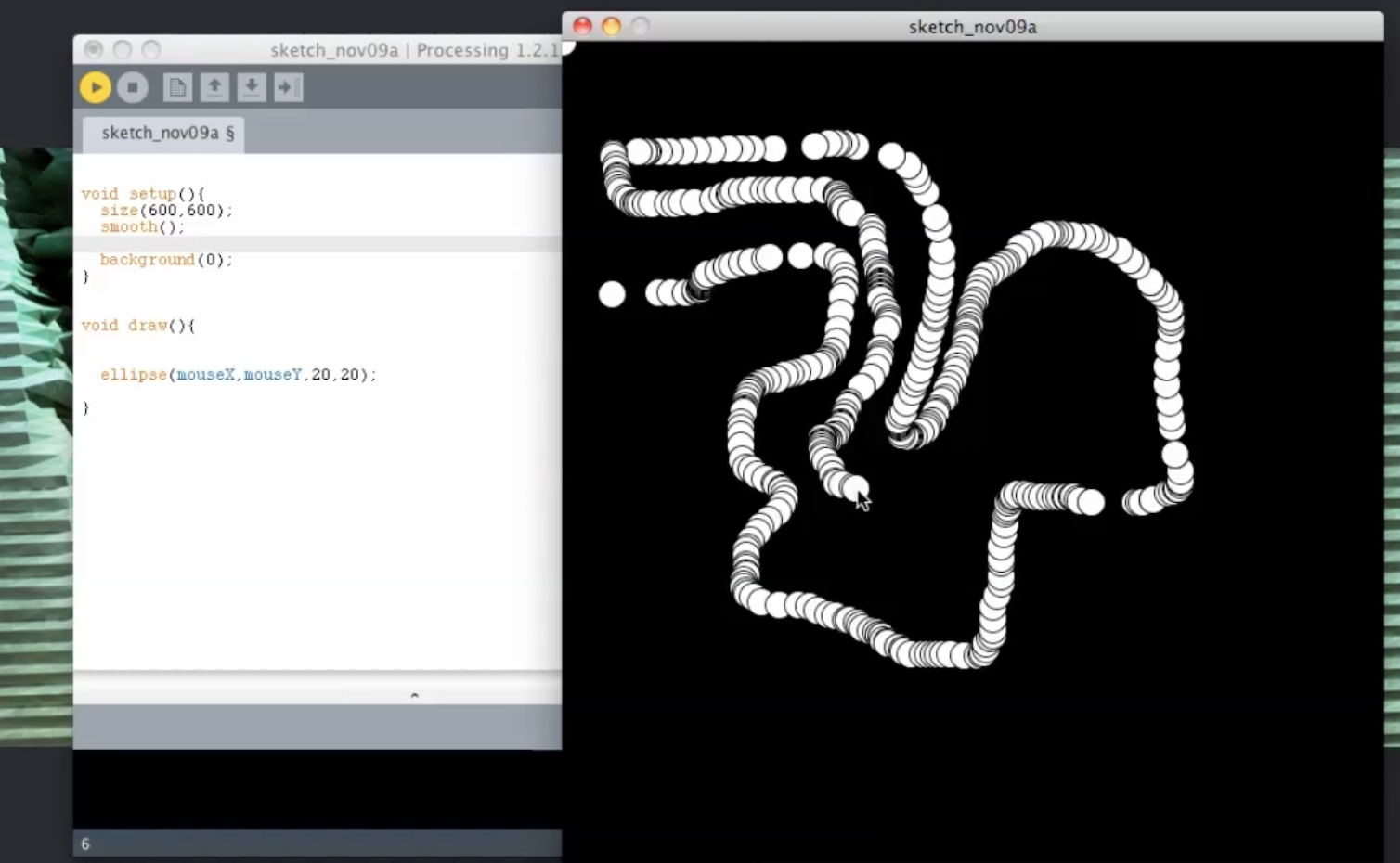
Processing is a free, open-source programming language and environment designed to teach coding through creative visual projects. It’s like digital paintbrush meets code, perfect for ADHD minds who thrive on creativity, instant feedback, and experimentation.
I recommend it to kids who love programming because it turns abstract logic into colorful, animated art instantly. One friend’s 12-year-old with ADHD went from zero interest in coding to spending hours creating bouncing shapes, fractals, and interactive games, all while sharpening problem-solving skills.
ADHD brains excel at pattern recognition and hyperfocus on engaging challenges. Processing delivers that: fast results, endless possibilities, and room for wild ideas. It’s not about perfection, it’s about play. My son even built a real-time music visualizer using sound input!
For kids who dream big, think fast, and want to make things, Processing isn’t just fun. It’s freedom.

Think of it as a creative coding canvas for kids who like to see their codes turn to magic.
While my son really loves Python and GD Script with Godot, we tried Processing for several times and he really enjoyed it, but he has a steady game design track now (he is 8) , that does not include processing.
NodeBox? For ADHD Kids Who Code? YES.
My brain explodes with ideas and as developer who also can design, i always wanted to paint with code, now NodeBox turns that chaos into magic. No boring syntax, no waiting. Just code, or even drag and drop → instant animation. Glitch art? Fractals? Dancing cities?, you name it Done in seconds.
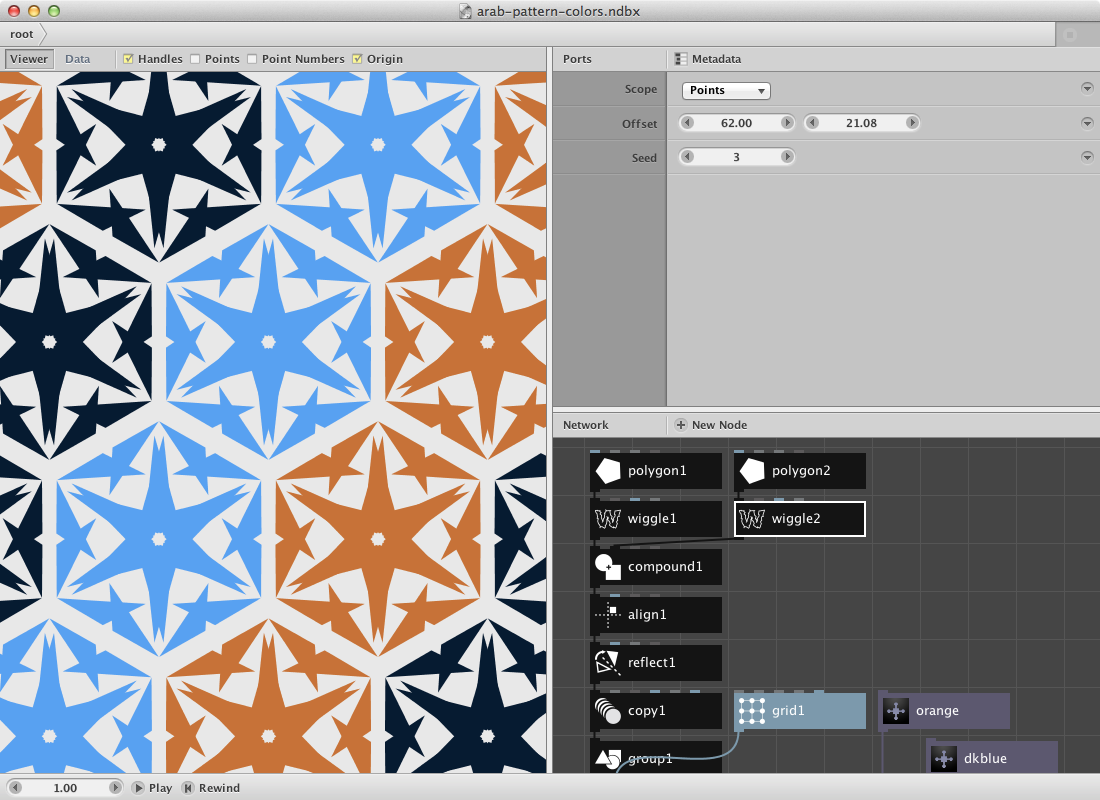
ADHD minds love this: instant feedback, wild creativity, pattern spotting on fire. No rules. Just make it weird, make it cool.
Perfect for game assets, animations, AI art, all from Python. I use it to turn my hyperfocus into something real.
And the best part, it is Free, open-source, runs anywhere (macOS, Windows and Linux).
Why ADHD Minds Love NodeBox
- Instant Feedback = Hyperfocus Fuel:
Every tweak creates a visual reaction, no waiting, no frustration. ADHD brains thrive on this loop. - Pattern Recognition on Steroids
ADHD kids are natural pattern detectives. NodeBox lets them see patterns in motion, perfect for learning logic through play. - Creative Freedom Without Rules
No “right” way to draw. No pressure to be perfect. Just experiment, break things, fix them, and make something wild. - Perfect for Glitch Art, Animations & Game Elements
Ideal for kids who want to design game assets, character animations, or digital collages, all from code.
Open-Source Creative Tools That Empower ADHD Creativity
Here’s the toolkit I use daily, with kids, teens, and even myself:
| App | Type | Why It Works for ADHD |
|---|---|---|
| Tux Paint | 2D Drawing | Playful, immediate feedback, zero pressure |
| Inkscape | Vector 2D Design | Infinite zoom, clean lines, perfect for planning |
| Blender | 3D Modeling & Animation | Endless possibilities — kids can build entire worlds |
| Goxel | 3D Voxel Sculpting | Like digital LEGO — tactile, satisfying |
| MagicaVoxel | 3D Voxel Art | Great for game assets, characters, and mini-worlds |
| Wings 3D | Light 3D Modeling | Simple interface, ideal for beginners |
These aren’t just apps, they’re creative escape hatches.
ADHD + Game Design = Superpower Combo
Let me tell you something most people miss: ADHD brains are pattern detectives. We see connections others miss. We jump between ideas faster than a lightning storm.
So when I introduced game level design using Tux Paint + simple logic blocks (like in Scratch), one teen with ADHD built an entire platformer in 3 days, complete with enemies, power-ups, and a boss fight.
His secret? “I just kept asking: What if this block was floating? What if the enemy had wings?”
That’s the ADHD superpower: curiosity-driven innovation.
My son is fascinated with Game design and he is 8, yet we design mostly on papers since he was 4 as I was determined to help him with his problem solving skills, now he is good at level design and game dynamics.
My Top 5 Tips for Parents & Educators (From a Doctor Who’s Been There)
1. Let Them Copy First, Then Improve
ADHD kids learn by imitation. Let them copy a character from a game or a fractal design. Then ask: “How would YOU make it cooler?”
2. Embrace the Chaos, It’s Creativity, Not Failure
They’ll go off-script. They’ll make a purple elephant with six legs and laser eyes. That’s not wrong, that’s genius. Celebrate the weirdness. Do not forget to celebrate small winnings.
3. Use Fractal Design for Stress Relief & Focus
Set a timer: 10 minutes of fractal experimentation. Watch their breathing slow down. Their focus sharpens. Magic.
4. Mix Media, Try Card Design, Character Design, Level Design
- Make fantasy cards (like Pokémon) in Inkscape
- Draw superhero avatars in Tux Paint
- Build pixel-art levels in MagicaVoxel or Goxel
5. Be a Guide, Not a Director
Sit beside them. Ask questions. Say: “Tell me about this creature…” Instead of “Fix your line.” Let them lead.
Remember: ADHD doesn’t mean less capable. It means more curious, more observant, more imaginative. ADHD people are fast, quick with their pattern recognition skills and problem solving, use that as superpowers.
Final Thought: The World Needs More Wild, Unfiltered Creativity
We spend so much time trying to “fix” ADHD. But what if we stopped fixing and started unleashing?
Open-source creative tools like Tux Paint, Inkscape, Blender, and fractal generators aren’t just apps, they’re lifelines.
They give kids and teens a safe space to explore, experiment, fail, and try again, all on their own terms.
And yes, sometimes they quit mid-project. That’s okay. ADHD minds aren’t linear. They’re explosive, sparky, beautifully chaotic.
But when they find joy in creating, that’s where focus begins.
On a personal note, I believe more than ever, most of the creative, and genius people had ADHD but managed to manage it well and hyperfocus their creativity to production.
You’re not broken. You’re brilliant. And your imagination? It’s the most powerful tool you have.
Now go create something wild.
Even if it’s messy. Especially if it’s messy.
Free Resources & Downloads (All Open-Source, All Free)
- Tux Paint – https://tuxpaint.org
- Inkscape – https://inkscape.org
- Blender – https://blender.org
- Goxel – https://goxel.com
- MagicaVoxel – https://magicavoxel.com
- Fractal Generators (Apophysis, Fragmentarium)
- Processing.org
- Nodebox.net
More Resources
 Hazem Abbas
 Hazem Abbas
 Hazem Abbas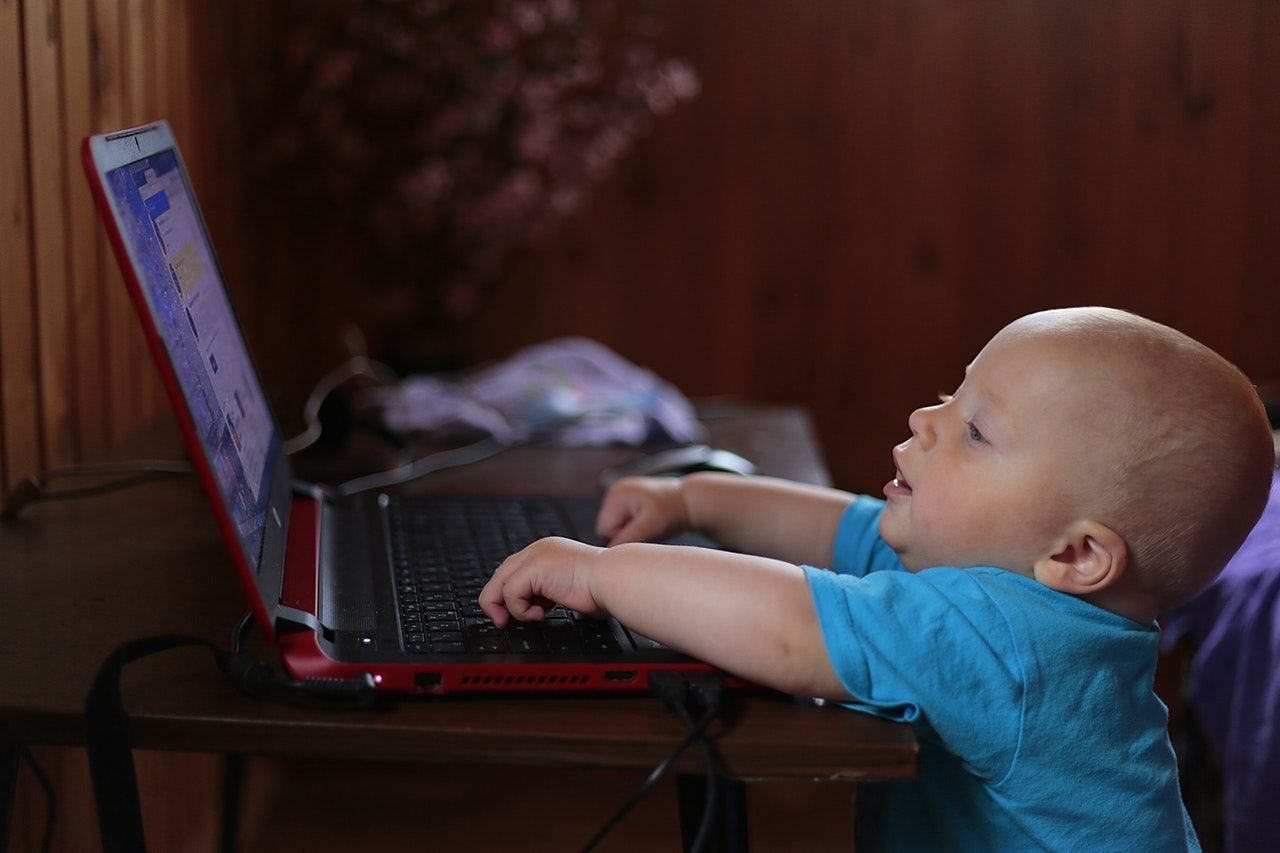
 Hazem Abbas
 Er Nur Uresin
 Hazem Abbas
 Hazem Abbas