9 AI-Powered Data Visualization Frameworks That Are Revolutionizing Business Intelligence & Science (Open-source)


What Is AI Data Visualization, And Why Does It Matter, especially Now?
Nowadays, AI-powered data visualization isn’t just a nice-to-have, it’s the secret weapon behind smarter decisions. Gone are the days of static charts and manual Excel reports.
Today, we’re using artificial intelligence to turn raw numbers into actionable insights, real-time dashboards, and intelligent visual narratives.
Whether you're a data scientist hunting for hidden patterns, a business analyst uncovering customer trends, or a C-suite executive needing instant clarity on KPIs (Key Performance Indicator), AI-driven visualization tools are transforming how we see, understand, and act on data.
The future of business intelligence isn’t just about having data. It’s about seeing what matters, instantly, clearly, and with predictive power.
 Hazem Abbas
Can AI Actually Make Data Easier to Understand?
Absolutely. Traditional charts can overwhelm users with complexity. But AI data visualization frameworks go beyond basic graphs. They:
- Auto-suggest the best chart type based on your dataset.
- Detect anomalies and highlight them visually.
- Use natural language to explain trends (“Sales dropped 23% in Q3 due to supply delays”).
- Enable interactive exploration with voice or text queries.
Use Case: A retail chain uses AI visualization to instantly spot regional sales drops and correlate them with weather, promotions, or inventory levels, all in one click.
2. How Do These Tools Help Data Scientists?
For data scientists, AI visualization is like having a co-pilot. Instead of spending hours cleaning data and building plots, you can:
- Use auto-encoding to visualize high-dimensional data (think PCA, t-SNE) with intuitive color-coded clusters.
- Apply anomaly detection algorithms that overlay red flags directly on timelines and heatmaps.
- Generate dynamic model performance dashboards that track accuracy, drift, and bias in real time.
Use Case: A healthcare AI team uses an AI-powered dashboard to monitor a diagnostic model’s performance across hospitals, instantly spotting where predictions start to fail.
3. Can AI Visualizations Improve Business Intelligence?
Short Answer: Yes.
They’re already doing it at scale. Modern BI platforms now integrate AI assistants that:
- Answer questions like “Show me revenue by region last month”, in plain English.
- Recommend new metrics based on business goals.
- Predict future trends and display them as forecasted lines on existing charts.
Use Case: A SaaS company uses AI-driven BI to auto-generate weekly reports, highlighting churn risks and upsell opportunities, saving 15+ hours per week.
 Hazem Abbas
4. Are There Open-Source AI Visualization Tools?
You bet! The open-source movement is booming with powerful frameworks that let developers build custom, scalable, and secure visualizations without vendor lock-in.
We’ve covered dozens of open-source NVR/DVR solutions, but AI visualization is the next frontier, and it’s being built by communities, not just corporations.
Use Case: A startup builds its own analytics platform using open-source AI libraries like Plotly + Scikit-learn + Streamlit, creating a real-time fraud detection dashboard that adapts as new threats emerge.
5. What’s the Future of Data Storytelling?
The future isn’t just charts, it’s narratives. AI tools now help turn data into stories:
- Automatically generate summaries from dashboards.
- Create animated walkthroughs of key findings.
- Combine visuals with AI-generated commentary for presentations.
Use Case: A marketing team uses AI storytelling to create pitch decks that dynamically update based on campaign results, no manual slides needed.
 Hazem Abbas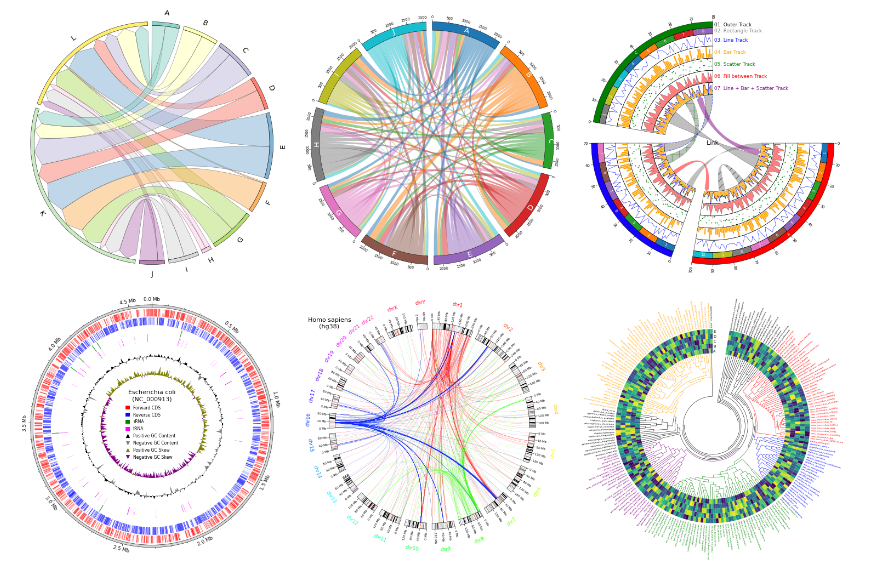
Open-source AI Data Visualizations Frameworks
1- Data Formulator: Create Rich Visualizations with AI
Data Formulator is a groundbreaking, AI-driven tool from Microsoft Research that transforms the way explore, analyze, and visualize data. It is built for analysts, researchers, developers, and data enthusiasts, Data Formulator blends natural language input with intuitive UI interactions to let you create rich, insightful visualizations, fast, smart, and iteratively.
Unlike traditional tools where you manually write SQL, clean data, and build charts step-by-step, Data Formulator uses AI agents to automate the heavy lifting, while still giving you full control.
It’s like having an intelligent co-pilot that understands your goals and helps you get there.
Lets break it down for you:
Start with a Goal, Let AI Guide You
- Ask: “Show me sales trends by region over time”
- AI instantly suggests exploration paths, visualizations, and even generates underlying SQL code.
- Perfect for beginners and experts, turns vague questions into actionable analysis in seconds.
Work with Large Datasets Like a Pro
- Upload massive files (CSV, Parquet, JSON) and auto-load them into DuckDB, ultra-fast local database.
- Drag-and-drop charts with on-demand data fetching → no lag, no crashes, even with 100K+ rows.
- Ideal for big data exploration without heavy infrastructure.
Anchoring for Smarter Iteration
- Anchor cleaned datasets, subsets, or joined tables to build future analysis on your version, not the raw mess.
- Prevents AI confusion, improves accuracy, and accelerates workflow efficiency.
 microsoft
2- Vizzy

Vizzy is an open-source that enables you to uses ChatGPT to visualize any kind of data.
The workflow is pretty straightforward: Upload data to Vizzy, which analyzes its structure and suggests context. Review or refine the summary for better accuracy.
Then, ask to visualize (e.g., scatterplot, trend over time). Enhance with colors, tooltips, or code edits. Easily iterate, tweak, and revert for perfect results, all powered by AI.
 rbren
rbren
3- DataLine: Chat with your Data using Natural Languages (Privately)
Now let's meet DataLine, the fastest, privacy-first AI tool to analyze and visualize your data using natural language. Whether you're a non-technical user or a developer, DataLine lets you ask questions like "Show me sales trends by region" and instantly generate charts, tables, and reports, all locally, securely, and without cloud uploads.
Perfect for teams, analysts, and anyone who wants to explore data fast, no SQL skills needed.
Its features include:
- Connect to 10+ data sources: PostgreSQL, MySQL, Snowflake, SQLite, Excel, CSV, SAS, Azure SQL, and more
- Ask anything in plain English → get instant SQL + results
- Auto-generate charts & visualizations from natural prompts
- Edit and re-run queries — tweak, save, reuse
- Export charts, tables, and reports in seconds
- Private by design, your data stays on your device, never sent to AI servers
- Full control: Modify generated code or keep it simple
- Works everywhere: Windows, Mac, Linux, Docker, and manual install
- Open-source & community-driven, help shape the future!
The best part is, you can easily install it on Windows, Linux and macOS, with one simple click.
 RamiAwar
4- Briefer
Briefer is the ultimate workspace for data teams, think Notion meets Jupyter, but built for real collaboration and real results. Whether you're a developer writing Python scripts, an analyst running SQL queries, or a non-technical user exploring dashboards, Briefer makes it easy to create, share, and interact with data.
Build rich notebooks and interactive dashboards with Markdown, SQL, Python, and native visualizations. Add dynamic inputs like dropdowns and date pickers to turn static reports into living data apps. Let the AI write clean, context-aware code, it knows your schema, your data, and your goals.
Run scheduled updates, test pipelines with writebacks, and collaborate in real time, multiple people editing the same notebook at once, seeing changes instantly.
And here’s the best part: deploy it in seconds. Just run one Docker command and you’re up and running on any server, no fuss, no complexity. Full control, zero vendor lock-in.
Install Briefer using Python
# Install Briefer
pip install briefer

# Run Briefer and access it on http://localhost:3000
briefer
Install and Run Briefer using Docker
# Run Briefer using Docker
docker run -d \
  -p 3000:3000 \
  -v briefer_psql_data:/var/lib/postgresql/data \
  -v briefer_jupyter_data:/home/jupyteruser \
  -v briefer_briefer_data:/home/briefer \
  briefercloud/briefer


  # Run Briefer using Docker
docker run -d `
  -p 3000:3000 `
  -v briefer_psql_data:/var/lib/postgresql/data `
  -v briefer_jupyter_data:/home/jupyteruser `
  -v briefer_briefer_data:/home/briefer `
  briefercloud/briefer
5- FiftyOne
FiftyOne is the open-source powerhouse for visual AI, enabling teams to visualize datasets, analyze models, fix data issues, and build better computer vision systems, all in a collaborative, extensible, and cloud-ready environment.
 Hazem Abbas
6- Data2Vis

Data2Vis is a groundbreaking cool AI experiment that turns raw data into stunning visualizations using sequence-to-sequence neural networks — no coding or design skills needed.
By training on thousands of Vega-Lite specs, it learns to auto-generate insightful charts from JSON data in seconds. While the original model uses TensorFlow 1.10 and Git LFS, its legacy lives on in LIDA, Microsoft’s next-gen tool powered by large language models.
This work laid the foundation for grammar-agnostic, AI-driven infographics. If you're building the future of data storytelling, this project deserves a spotlight, be featured on Google as a pioneer in intelligent visualization.
 victordibia
7- Vizro
Vizro; the open-source Python toolkit that lets you create stunning, interactive data apps in minutes. No design degree. No engineering PhD. Just clean, low-code configuration and smart defaults built on visual design best practices. Whether you're exploring data, presenting insights, or building internal tools, Vizro turns your ideas into polished, multi-page dashboards with minimal effort.
And it doesn’t stop at prototyping, Vizro is built for production. Seamlessly customize layouts, themes, and interactivity, then deploy your app at scale.
With full control, zero bloat, and a focus on real-world impact, Vizro empowers teams to ship beautiful, high-performance data experiences fast. Open-source, Python-powered, and designed for people who want to build, not just code.
Features
- One Config. Infinite Possibilities: Define your entire app in minutes using clean, intuitive syntax, Pydantic, JSON, YAML, or Python dicts. No boilerplate. No headaches.
- Components That Just Work: Charts, tables, KPIs, cards, forms, all pre-styled and production-ready. Plug in, go live.
- Controls That Feel Natural: Sliders, dropdowns, date pickers, smart, responsive, and instantly interactive.
- Actions That Bring Your App to Life: Drill-downs, filters, exports, dynamic updates, make it reactive without writing a single line of JavaScript.
- Layouts That Adapt, Not Break: Grids, flex containers, responsive styles, your app looks flawless on any screen.
- Navigation That Scales: Nested pages, breadcrumbs, sidebars, build complex apps with simple structure.
- Low-Code Magic, High-Code Freedom: Start simple. Go deep. Add custom HTML, CSS, JS, or Python for full control, modular, clean, and future-proof.
- Built on the Best Open Source Stack: Powered by Plotly, Dash, and Pydantic, trusted, fast, and battle-tested.
- From Prototype to Production in One Step: No rewrites. No redesigns. Just deploy. Scale effortlessly.
 mckinsey
8- Perspective

Perspective is an interactive analytics and data visualization component, which is especially well-suited for large and/or streaming datasets. Use it to create user-configurable reports, dashboards, notebooks and applications.
- Blazing-Fast Streaming Queries: C++-powered, compiled to WebAssembly, Python & Rust for ultra-low latency; handles Apache Arrow streams with zero memory overhead.
- Columnar Expression Engine, Built on ExprTK for high-performance, real-time data transformations, ideal for analytics, filtering, and dynamic calculations.
- Framework-Agnostic UI, A reusable Custom Element that runs in-browser (via WASM) or remotely (via WebSocket), seamlessly integrating into any app, no React, Vue, or Angular required.
- JupyterLab Integration: Full notebook support with interactive widgets and a Python client library, perfect for exploratory analysis and prototyping.
- Production-Ready & Scalable: From local notebooks to cloud deployments, it scales effortlessly across environments while maintaining speed and security.
 finos
finos
9- LLM Comparator
LLM Comparator is an interactive visualization tool with a python library, for analyzing side-by-side LLM evaluation results. It is designed to help people qualitatively analyze how responses from two models differ at example- and slice-levels. Users can interactively discover insights like "Model A's responses are better than B's on email rewriting tasks because Model A tends to generate bulleted lists more often."
 PAIR-code
If you're not leveraging AI data visualization, you're leaving money, efficiency, and insight on the table.
These tools aren’t just flashy. They’re practical, powerful, and essential for:
- Faster decision-making
- Deeper data understanding
- Proactive problem-solving
- Democratizing data access across teams
🚨 The companies winning today aren’t the ones with the most data — they’re the ones who see it best.
Ready to Transform Your Data Game?
Don’t just look at data. Let AI show you what it’s saying.
Try one of these frameworks today. Build a dashboard. Ask a question. Watch the answer unfold, in seconds.
Because in the age of AI, the fastest insight wins.
More Readings
- From Prompts to Queries: Exploring AI-Driven SQL Generation - The Future of Data Retrieval
- 22 Open-source Database Visualization Panels and Dashboards for Business Intelligence (BI)
- 33 Free Data Visualization Libraries, Frameworks and Apps, Mastering Data Presentation
- Top 25 Python Libraries and Frameworks for Stunning Data Visualizations in 2024
- 31 Free React Data Visualization and Chart Libraries
- 21 Open Source Free Map Design and Geo Visualization Tools
- Gephi is an award-winning, free, Data Visualization App Available for Windows, Linux, and macOS