Context: is a Native macOS for Testing and Debugging MCP Servers

What is Context?
Introducing Context: The Ultimate Debugging Playground for MCP Server Developers (macOS Only)
Tired of wrestling with invisible errors in your MCP servers? Say hello to Context, the sleek, powerful, and beautifully simple native macOS app built from the ground up for developers who live and breathe MCP.
No more guesswork. No more messy logs. With Context, you get real-time visibility into your MCP server’s inner workings, all through a clean, intuitive interface that feels like it was made for human brains, not just machines.
What Makes Context Unmissable?
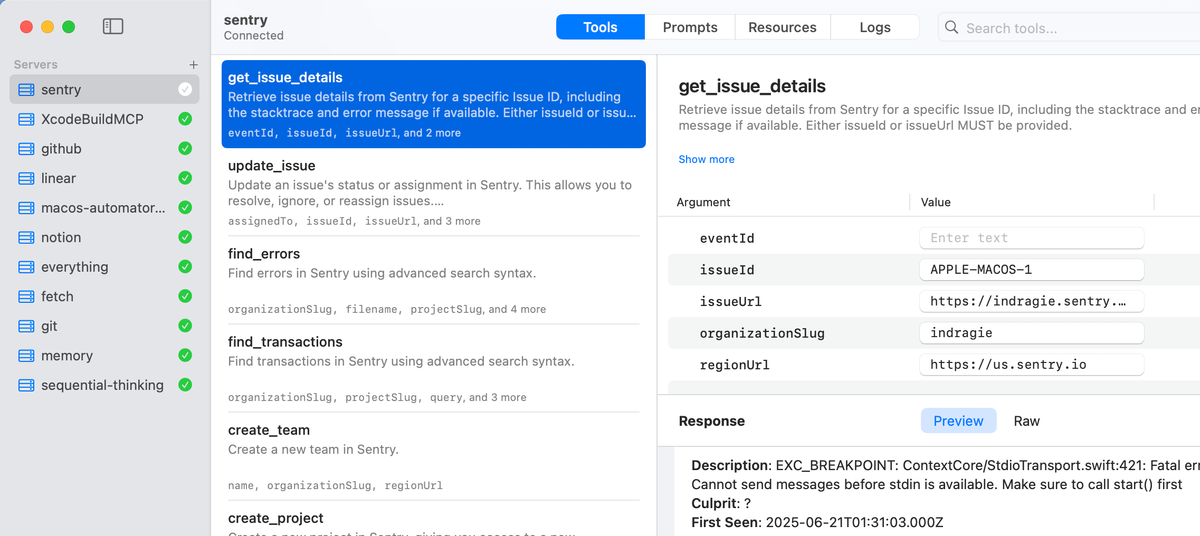
- Visual Tool Invocation: Click, test, debug, no CLI headaches. Invoke tools with one tap and instantly see results.
- Live Resource Preview: See how your data flows in real time, images, JSON, text, even complex payloads, rendered beautifully before your eyes.
- Real-Time Log Monitoring: Watch logs stream in as they happen. Filter, search, and trace issues faster than ever.
- Multi-Connection Support: Run and compare multiple MCP servers at once, perfect for testing, staging, or A/B workflows.
- Built for macOS, Designed by Devs, For Devs: Native performance, buttery smooth UI, and deep system integration, because you deserve better than a clunky terminal.
This is more than a debugger. It’s your MCP development cockpit.
Features
- Native macOS application built with Swift and SwiftUI
- Connect to multiple MCP servers simultaneously
- Auto-import of MCP servers from Cursor, Claude Code, Claude Desktop, Windsurf, and VS Code
- Auto-generated UI for tool invocation based on JSON Schema
- Dynamic prompt generation with template-based arguments
- Built-in resource previews with syntax highlighting and QuickLook support
- Real-time log streaming with filtering and structured log viewing
- Comprehensive MCP specification support (work in progress)
- OAuth with dynamic client registration and metadata discovery
- Support for stdio and Streamable HTTP transports (including HTTP+SSE backward compatibility)
What’s Coming Next? (Spoiler: It’s Awesome)
Context isn’t done evolving, it’s just getting started. Future updates will turn it into the definitive MCP debugging suite, with:
- Full support for the latest MCP specification standards
- Advanced tracing & request/response proxying for deep inspection
- An integrated AI chat client that plugs directly into your MCP servers, talk to your tools, ask questions, automate workflows
- Customizable debug panels, breakpoints, and workflow visualization
Think of it as Postman meets VS Code meets ChatGPT, but for MCP.
Why Developers Are Already Obsessed
Whether you're building AI agents, smart workflows, or next-gen tool integrations, Context gives you the clarity, speed, and control you need during development, without the noise.
It’s not just a tool. It’s a mindset shift: debug smarter, build faster, ship with confidence.
Context is free. It’s open source. And it’s already changing how developers work with MCP.
Download now and start building the future.
 indragiek