Is using VPN Still Relevant in 2025 & 2026? and What are the best Free and Integrated Privacy-focused VPN Services!

Is a VPN Still Your Digital Bodyguard in 2025? (Spoiler: Yes!)
Let’s cut through the noise. In a world where your data is the hottest commodity and cyber threats are evolving faster than ever, the question isn't if you need a VPN, it’s why you aren't using one yet.
A VPN, or Virtual Private Network, is your personal digital bodyguard. It encrypts your internet traffic and masks your IP address, creating a secure, private tunnel between you and the wild west of the internet .
What is a VPN?
Think of it this way: without a VPN, your online activity is like sending a postcard. Anyone, your ISP, advertisers, hackers on the same coffee shop Wi-Fi, can read it. A VPN seals that postcard in an unbreakable envelope. In 2025, this is non-negotiable for several reasons.
First, cyber threats are more sophisticated than ever, demanding better security .
Second, it’s your primary shield for internet privacy, keeping your browsing habits out of the hands of trackers and data brokers .
And let’s not forget the golden rule of public Wi-Fi: never trust it without a VPN, or you’re basically handing your passwords to a stranger .
So, is a VPN still relevant for 2025 and beyond? Absolutely. It’s essential for protecting your digital life, accessing region-locked content, and even preventing your ISP from throttling your speed on certain sites .
Now, what if you’re not ready to shell out cash? The hunt for a truly free and privacy-focused VPN is tough. Most “free” services are a trap, monetizing your data to stay afloat. But a few honorable exceptions exist.
Beyond Privacy: Real Threats a VPN Helps You Avoid
Here’s a breakdown of key threats a VPN can protect you from:
1. Public Wi-Fi Hackers
Coffee shops, airports, and hotels often offer free Wi-Fi, but these networks are prime hunting grounds for cybercriminals. Without encryption, your login credentials, messages, and financial info can be intercepted in seconds.
How a VPN helps: It encrypts all your internet traffic, making your data unreadable to snoopers, even if they’re on the same network.
 Medevel Editor’s pick
2. ISP Tracking & Data Profiling
Your Internet Service Provider (ISP) can see every website you visit, how long you stay, and even what you download. Many ISPs sell this data to advertisers or throttle your speed based on usage.
How a VPN helps: It hides your browsing activity from your ISP by routing traffic through an encrypted tunnel. They’ll only see that you’re connected to a VPN, not what you’re doing online.
3. Online Tracking & Behavioral Ads
Websites, social media platforms, and ad networks track your behavior across the web to build detailed profiles for targeted ads.
VPN help you masking your real IP address (which reveals your location and identity), a VPN makes it harder for trackers to link your activity across sites, especially when combined with privacy browsers or ad blockers.
4. Geo-Restrictions & Censorship
Governments, schools, or workplaces may block access to news sites, social platforms, or educational resources. Even streaming services limit content based on your location.
VPN lets you connect to servers in other countries, bypassing censorship and unlocking region-locked content—safely and legally (in most places).
5. Bandwidth Throttling
ISPs sometimes deliberately slow down your connection when you’re gaming, streaming, or downloading large files.
How a VPN helps: Since your ISP can’t see what you’re doing online, they can’t selectively throttle your bandwidth based on activity.
6. DDoS Attacks (for Gamers & Remote Workers)
Online gamers and professionals using public IPs are vulnerable to DDoS (Distributed Denial of Service) attacks, which can knock them offline mid-match or during a critical call.
How a VPN helps: It hides your real IP address, making it nearly impossible for attackers to target your device directly.
 Hazem Abbas
What a VPN Doesn’t Protect You From:
- Malware or phishing emails → Use antivirus software and practice safe browsing.
- Cookies or browser fingerprinting → Pair your VPN with privacy tools like uBlock Origin or Brave Browser.
- Account compromises due to weak passwords → Always use a password manager and enable 2FA.
Best Free VPN services that We Tried So far!
1- Proton VPN
Proton VPN stands head and shoulders above the rest. It’s the only free VPN that security experts consistently recommend . Why? Because it offers truly unlimited data with no ads and no sneaky speed throttling .
You get access to servers in a handful of countries (US, Netherlands, Japan, Romania, and Poland) . The catch? You can’t manually pick your server, and it doesn’t support streaming or torrenting on the free tier, but for pure, private browsing, it’s unmatched .
2- Windscribe
Another solid contender is Windscribe. It’s a powerful privacy tool that gives you a generous 10GB of data per month for free . What makes Windscribe cool is that its free version includes the same robust security features as its paid plans, like a kill switch, strong AES-256 encryption, and even built-in ad and malware blocking . It’s a feature-rich option that feels premium, even when you’re not paying a dime .
3- Opera VPN
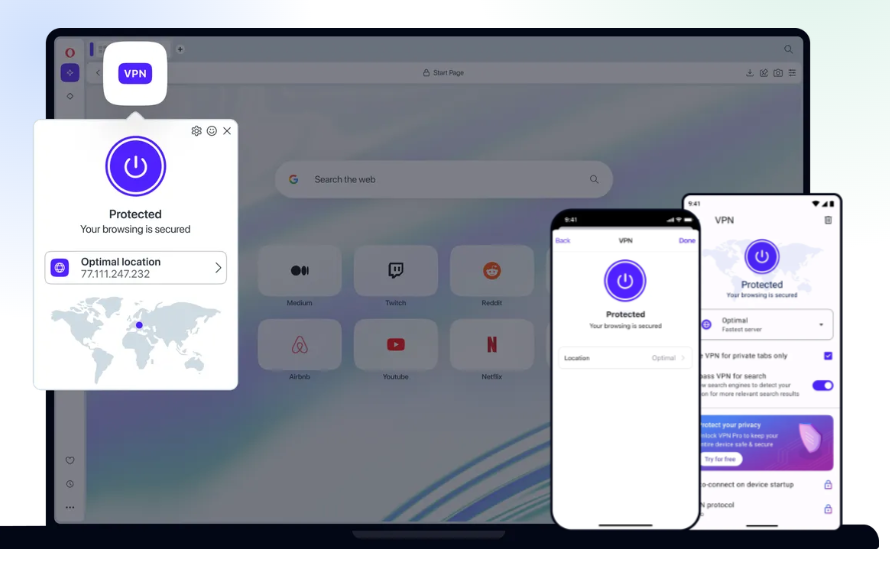
Opera, the popular web browser, includes a built-in free VPN that requires no extensions, just enable it and browse securely. It encrypts traffic within the browser, offers unlimited usage, and provides access to 100+ servers across 3 general regions. While it’s browser-only (not system-wide), it’s truly no-logs and completely free.
For broader protection, Opera VPN Pro ($4/month) secures your entire device, up to 6 devices including Android and iOS, with 3,000+ high-speed servers across 30+ countries. Both options are no-logs and work seamlessly on mobile and desktop, making Opera a convenient choice for privacy-conscious users who want integrated, easy-to-use VPN protection without third-party tools.
4- Brave with Firewall and VPN
Brave, the privacy-focused web browser launched in 2016, offers a built-in premium VPN service called Brave Firewall + VPN. Unlike basic browser-only protections, Brave VPN encrypts all internet traffic across your entire devic, including apps outside the browser, on Windows, macOS, Android, and iOS.
With a strict no-logs policy, independently audited security, and over 300 high-speed servers in 40+ regions, it lets users mask their IP address, bypass geo-restrictions, and avoid ISP throttling. A single subscription covers up to 10 devices, and features like a built-in firewall (desktop), smart proxying, and a kill switch (iOS) enhance protection.
While the browser itself is free, Brave VPN is a paid service, but it’s seamlessly integrated, requires no extra downloads, and uses a privacy-preserving login method. Ideal for travelers and privacy-conscious users, it delivers fast, secure, whole-device protection without compromising usability.
5- WARP (Not a VPN)
WARP is a free app by Cloudflare that encrypts your internet traffic, just like a standard VPN, helping protect your data from on-path eavesdroppers (like those lurking on public Wi-Fi). It also enhances DNS privacy and routes your traffic through Cloudflare’s high-performance global network, often resulting in faster, more reliable connections. These benefits make it a great tool for everyday browsing security and performance.
However, WARP does not hide your real IP address for anonymity, doesn’t let you choose server locations, and won’t bypass geo-blocks for streaming services or region-restricted content. You’re assigned a shared Cloudflare IP, but it’s tied to your general region, so no Netflix hopping or evading censorship. Cloudflare itself is clear: WARP was never meant to replace a true privacy-focused VPN if your goal is online anonymity or location spoofing.
That said, we highly recommend WARP, as a lightweight, no-logs layer of baseline protection for all your devices. It’s fast, easy to set up, and adds meaningful security without slowing you down. Think of it as a “privacy booster” for daily use, not a full anonymity suite.
And the best part? WARP can even run alongside a traditional VPN if you want both performance (from WARP) and privacy/location control (from your VPN).
If you’re looking for a simple, free way to encrypt your traffic and browse more securely, without the complexity of a full VPN, Cloudflare WARP is an excellent choice. Just don’t expect it to do everything a privacy-centric VPN can. For most users, though, it’s a smart first line of defense.
The Bottom Line
A VPN is a powerful privacy shield, but it’s not a magic invisibility cloak. Used wisely, especially alongside other security habits—it dramatically reduces your digital risk footprint. In 2025, with AI-powered surveillance and data brokers operating at scale, a trusted VPN isn’t just smart… it’s essential.
🔐 Pro tip: For maximum protection, choose a no-logs, independently audited VPN (like Proton VPN or Mullvad) and avoid “free” services that monetize your data. Your privacy is worth more than a few dollars a month.
Looking for more VPN resources?
 Hazem Abbas
 Hazem Abbas
 Hazem Abbas
 Hazem Abbas
 Hazem Abbas
 Hazem Abbas
 Medevel Editor’s pick
 Medevel Editor’s pick
 Hazem Abbas