This $0, 20MB AI Note App Is a Game-Changer, If You Can Read Chinese
NoteGen: AI Markdown Note App for Productive People, with a major Usability Bug!

Why NoteGen Just Became Our New Favorite Markdown App (And Why We’re Obsessed)
If you’ve been following our journey through the wild, wonderful world of Markdown note-taking apps, and let’s be honest, we’ve written about a lot of them, then you know we’re picky. We’ve tested open-source giants, sleek minimalists, AI-powered dream machines, and everything in between. From Obsidian to Joplin, Logseq to Typora, we’ve put every tool through its paces.
But lately? Something’s changed.
Checkout NoteGen, a fresh, bold, and brilliantly simple cross-platform Markdown app that doesn’t just do notes… it elevates them.
A Tiny App with Massive Vision
At just 20MB, NoteGen installs faster than your morning coffee brews. No bloated junk, no sneaky ads, no bundled software. It’s pure, clean, and built for one thing: helping you turn fleeting thoughts into meaningful knowledge, fast.
Built on Tauri 2, it runs smooth across Windows, macOS, Linux, iOS, and Android, and best of all? Free multi-device sync. Yes, really. Your notes flow seamlessly between your laptop, tablet, and phone, no subscription, no hassle.
Capture the Chaos, Create the Clarity
We love how NoteGen embraces the messy beauty of real-life thinking. Need to jot down a random idea from a meeting? Snap a screenshot. Stumbled upon a brilliant quote online? Paste the link. Got a sketch doodled in the margins of a notebook? Upload it. Text, files, illustrations, links, it all fits.
It’s not just about recording. It’s about bridging the gap between raw input and polished output, and that’s where the magic happens.
The AI That Doesn’t Overwhelm (But Actually Helps)
NoteGen isn’t just a container for your ideas. It uses AI to help you organize fragmented knowledge, turning scattered scraps into coherent, readable notes. No more staring at a wall of unstructured text. The AI gently suggests structure, summarizes key points, and even helps refine your writing without taking over your voice.
It’s like having a thoughtful editor who knows your style, respects your thoughts, and never interrupts mid-sentence.
Features We Really Like!
- 20MB Beast: Install in seconds. Run fast. No bloat. No ads. No nonsense.
- Cross-Platform Powerhouse: Windows • macOS • Linux • iOS • Android, One app. Everywhere you go. Seamless sync. Zero cost.
- Capture Life as It Happens: Screenshots • Text snippets • Sketches • Files • Links • Voice notes
- Pure Markdown (.md), No Tricks: Native storage. No proprietary formats. Full control. Easy to migrate. Forever future-proof.
- Offline Like a Pro: Work offline? Done.
- Sync to GitHub, Gitee (private repos), or WebDAV with full version history and rollback — like Git, but for your thoughts.
- AI That Actually Helps (Not Hypes): Plug in ChatGPT, Gemini, Ollama, LM Studio, Grok, or any custom model.
Fully configurable. Your AI. Your rules. - RAG Mode: Turn Notes Into a Brain: Your notes = your knowledge base.
- Built-in embedding + reranking models. Ask questions. Get answers. From your own ideas.
- Smart Sync, Smarter Privacy: Free multi-device sync. End-to-end encryption. Host it yourself. Keep it private. Own your data.
- Open Source. Transparent. Trusted: Built on Tauri 2. Lightweight. Secure. Community-driven. No vendor lock-in.
Why We’re Head Over Heels
We write about Markdown tools because we believe in open, transparent, and empowering tech, and NoteGen nails that. It’s open-source, lightweight, and built with real users in mind. But beyond the specs, here’s why we like it:
- It feels intentional, not overwhelming.
- It supports real-world workflows, not just idealized digital zen.
- It’s future-proof, built on Tauri, which means performance and security are baked in.
- And most importantly: it makes writing feel easy, even when your brain is full of chaos.
Final Thought
In a sea of note-taking apps that promise everything but deliver noise, NoteGen stands out like a quiet storm — powerful, focused, and deeply human.
If you’re tired of tools that demand too much from you, or if you’re someone who believes knowledge should grow organically, then give NoteGen a try.
It’s not just another Markdown app.
But, Do You know Chinese?
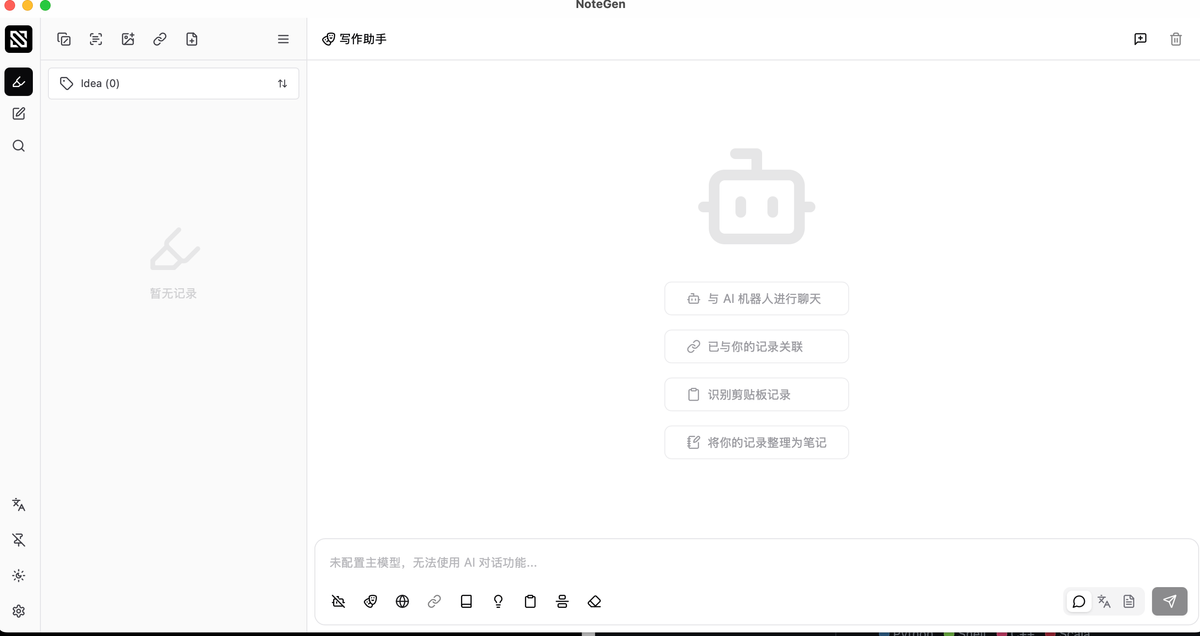
But wait a sec: it defaults to Chinese, making language switching difficult without understanding the interface, especially for non-Chinese speakers. A clean design hides a usability hurdle.
Resources & Downloads
 codexu