OpenScreen: The Free, Open-Source Screen Recorder for Makers Who Hate Subscriptions

What if you could make beautiful product demos… without the monthly bill?
You know the feeling. You need to record a quick walkthrough, a tutorial, or a product demo. You want smooth zooms, clean audio, and that polished "pro" look, but you don't want to sign up for another $29/month subscription.
Try, OpenScreen.
It's not a clone.
It's not a knockoff. It's a free, open-source screen recorder built for creators, developers, and educators who want control without the cost.
If Screen Studio is the luxury sedan of screen recording, OpenScreen is the reliable, no-nonsense hatchback that gets you exactly where you need to go, without the lease payment.
So… what is OpenScreen, exactly?
OpenScreen is a lightweight, open-source desktop app that helps you record your screen, add smart zooms, and capture audio, so you can create clean, engaging videos for tutorials, product demos, or team updates.
It's built for the 80% of use cases: the walkthroughs, the onboarding videos, the bug reports, the "let me show you how this works" moments.And yes, it's 100% free. For personal use. For commercial use.
Forever. No trials. No watermarks. No "upgrade to unlock" prompts.Just record, edit, export. Done.
It is for:
- Indie developers: shipping product updates and changelogs
- Educators: creating tutorials or course content on a budget
- Support teams recording bug reproductions or user guides
- Content creators making YouTube walkthroughs without subscription fatigue
- Privacy-focused users who want offline, open-source tools they can audit
Why does OpenScreen matter right now?
Great question.We're in the age of async communication. Teams are remote. Products are complex.
And video is the fastest way to explain, teach, or showcase.But most screen recording tools fall into two camps:
- Free but limited: Basic recorders with no zooms, no polish, no flexibility
- Polished but pricey: Beautiful tools locked behind monthly subscriptions
Features
- Record your whole screen or specific windows.
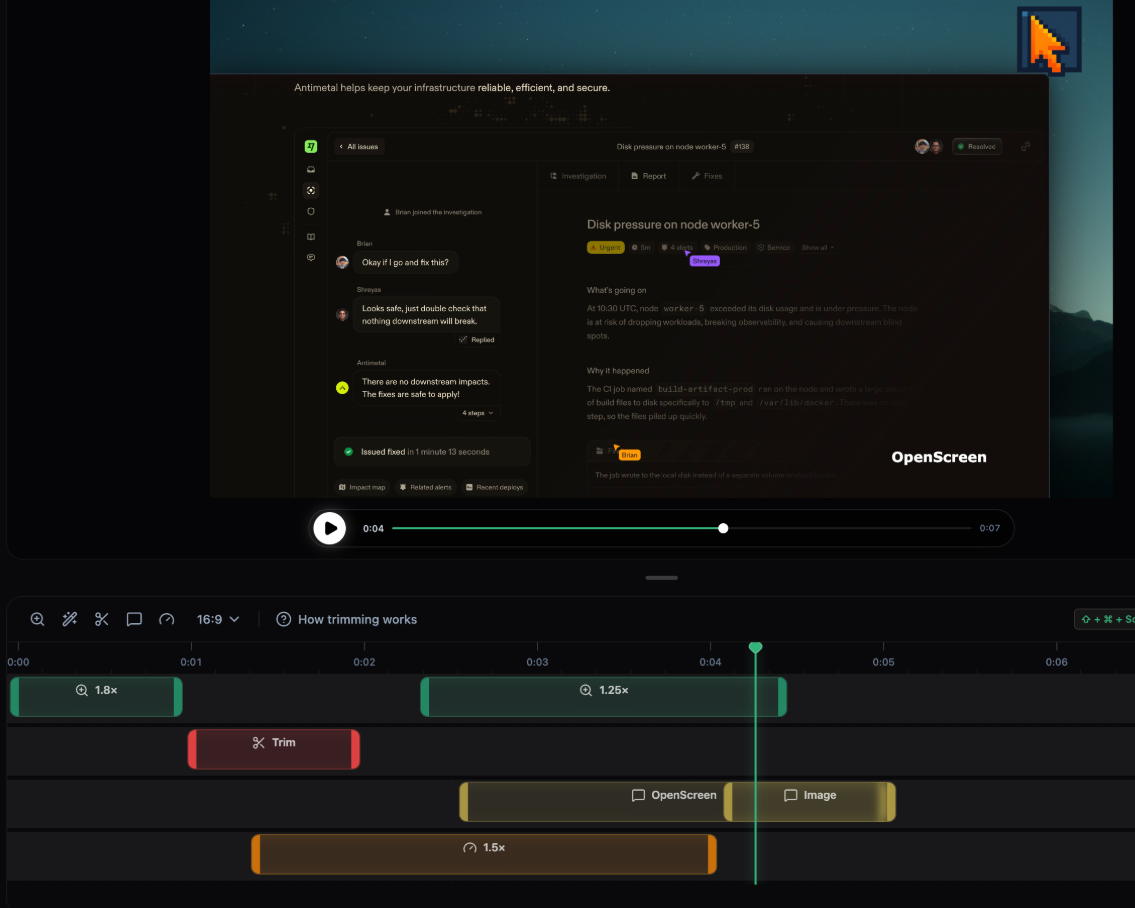
- Add Automatic zooms or manual zooms (customizable depth levels).
- Record microphone audio and system audio capture.
- Customize the duration and position of zooms however you please.
- Crop video recordings to hide parts.
- Choose between wallpapers, solid colors, gradients or a custom background.
- Motion blur for smoother pan and zoom effects.
- Add annotations (text, arrows, images).
- Trim sections of the clip.
- Customize speed at different segments.
- Export in different aspect ratios and resolutions.
License
The project is a free & open-source app that is released under the MIT License.
Resources & Downloads
 siddharthvaddem