Running macOS Easy On Any Computer is Not a Dream Anymore with OSX-PROXMOX

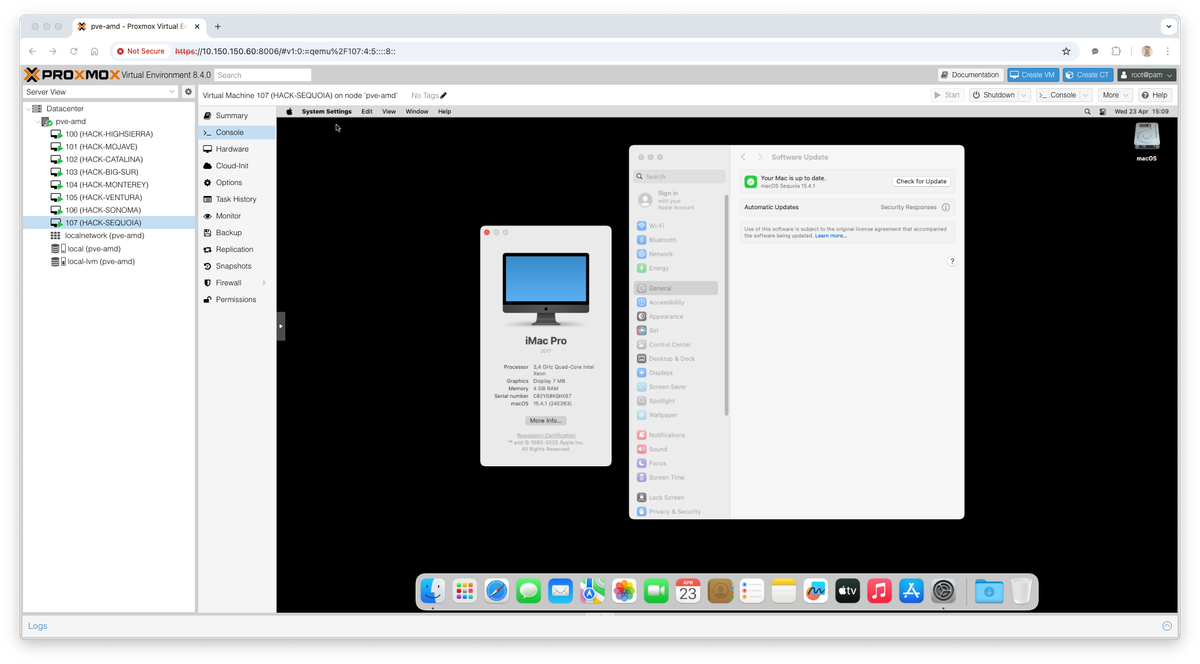
Unlock macOS on Any Rig with OSX-PROXMOX
Let’s be honest: Hackintoshing is usually a headache of kexts, config files, and kernel panics. OSX-PROXMOX changes the game. It’s a script that automates the heavy lifting, letting you run a butter-smooth macOS VM on your existing hardware using Proxmox VE.
Whether you're rocking an AMD Ryze or an Intel Core, you can spin up a Mac environment in minutes.
Why This Rocks and Why it Works?
- Literally One Command: Forget reading 50-page guides. Open your shell, paste one line, and you’re rolling.
- Hardware Agnostic: AMD or Intel? Doesn't matter. No need to buy overpriced Apple silicon just to test an app or learn the OS.
- Bleeding Edge Ready: Supports everything from the vintage High Sierra all the way up to macOS Sequoia (v15).
- Under the Hood: It comes pre-loaded with OpenCore 1.0.4, SIP enabled, and authentic Apple-signed recovery images. It’s secure and stable.
- Cloud Capable: Want a remote Mac? This plays nice with VultR and other cloud providers.
The Specs
- Proxmox Support: Runs great on v7.0 through v8.4 (and we're already testing v9.0 beta).
- Network: effortless bridging and subnet support.
💡 Pro Tip (The "TSC" Thing):
If you are running macOS Monterey or newer, your host CPU needs a working TSC (Time Stamp Counter). If your hardware doesn't have a stable TSC, the VM might crash when you assign multiple cores. Check your BIOS/Host settings first!
Let's Do This
Ready to build your dream setup?
- Open your Proxmox Web Console.
- Click on your node and open the Shell.
- Paste this magic line and hit Enter:
Bash
/bin/bash -c "$(curl -fsSL https://install.osx-proxmox.com)"
That’s it. The script handles the rest.
Standard Disclaimer: This project is for educational and research purposes. Always backup your critical data before tinkering with VMs!
Supported macOS Versions
- macOS High Sierra - 10.13
- macOS Mojave - 10.14
- macOS Catalina - 10.15
- macOS Big Sur - 11
- macOS Monterey - 12
- macOS Ventura - 13
- macOS Sonoma - 14
- macOS Sequoia - 15
Resources
GitHub - luchina-gabriel/OSX-PROXMOX: Voilà, install macOS on ANY Computer! This is really and magic easiest way! PVE 7.XX ~ 8.XX Support and macOS High Sierra ~ macOS Sequoia Support.
Voilà, install macOS on ANY Computer! This is really and magic easiest way! PVE 7.XX ~ 8.XX Support and macOS High Sierra ~ macOS Sequoia Support. - luchina-gabriel/OSX-PROXMOX
 luchina-gabriel