
Stop Overloading Your Brain: How NeuroFlow Turns Browsing Into Focus (For ADHD Minds)
NeuroFlow - ADHD-Friendly Todo Chrome Extension, is AWESOME

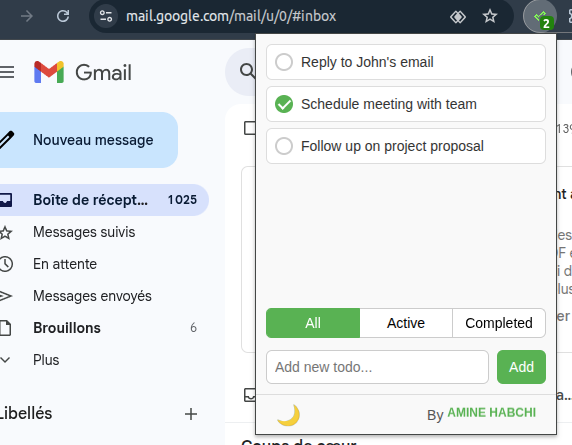
You know the drill, as many ADHDers, you open a task manager, and suddenly you’re overwhelmed by lists, labels, projects, priorities, and before you know it, you’re 30 minutes deep into organizing your organization system. 😩
That’s why when I found NeuroFlow, I didn’t just install it, I high-fived myself.
NeuroFlow, The ADHD-Friendly Todo Chrome Extension That Works With Your Brain, Not Against It
As a doctor, developer, and someone who’s spent years testing every ADHD productivity tool under the sun (seriously, we’ve written about dozens on our blog), I can say with full confidence: NeuroFlow is one of the most thoughtfully designed tools for neurodivergent minds in 2025.
Why NeuroFlow Feels Like Magic (Especially If You Have ADHD)
Most task apps treat your brain like a spreadsheet.
NeuroFlow? It treats your brain like a human being.
Here’s how it actually works, and why it’s so damn good:
1- Context-Aware Task Capture (No More Mental Juggling)
When you're on Wikipedia, NeuroFlow shows only tasks relevant to research.
On YouTube? Only videos or learning goals.
On GitHub? Just coding tasks.
On Amazon? Shopping list items.
In summary, It organizes your tasks by context, not by project, not by priority, but by where you are.
This matches how ADHD brains naturally compartmentalize thoughts. No more "Wait… did I write that down on my notes app or my phone?"
2- Minimalist Design = Less Cognitive Load
No flashy buttons. No cluttered dashboards.
Just a clean, elegant popup that appears when you click the extension icon, exactly when you need it.
This is huge. For people with ADHD, visual noise kills focus faster than a pop-up ad during a deep work session.
3- Instant Task Capture (Before Your Thought Vanishes)
You’re reading an article about quantum physics and suddenly go, "I should learn this!"
Instead of opening a new note, switching tabs, and losing momentum, just click NeuroFlow, type it in, and boom. Done.
We lose ideas all the time. NeuroFlow stops that from happening.
4- Visual Progress Tracking = Built-In Dopamine Hits
Completed tasks? They visually disappear.
Active tasks? Clearly highlighted.
No mental gymnastics. No “did I finish that?” confusion.
This small win gives you micro-dopamine hits, which, let’s be honest, we all need.
Persistent Memory (Yes, Even When You Forget to Check)
Your tasks stay saved. Even if you forget to check NeuroFlow for days.
Even if you’re in a hyperfocus spiral. Even if you accidentally close your browser. It remembers. And that’s peace of mind.
Hyperfocus Mode? Yes, Easy.
One of my favorite moments? I’m deep in a coding session on Stack Overflow.
All I see in NeuroFlow? Coding tasks. No social media reminders. No grocery list distractions. Just flow.
No mental context-switching. No guilt. Just pure, focused energy.
That’s what NeuroFlow delivers: productivity without burnout.
Features
- Built specifically for neurodivergent minds who thrive on clarity, not chaos
- Only shows you tasks relevant to the website you’re on, no mental overload
- Capture ideas in seconds, perfect for those fleeting “I should remember this!” moments
- Clean, minimal design means zero distractions and maximum focus
- Tasks save automatically and stay safe, even if you forget to check
- Dark mode helps reduce eye strain during long work or hyperfocus sessions
- Instantly switch between all, active, and completed tasks, no thinking required
- Subtle badge counter gently reminds you of pending tasks, no spam, no stress
- Use keyboard shortcuts (like Enter) to add tasks fast, no mouse needed
- Automatically organizes tasks by website domain, so GitHub stays separate from Amazon
- Zero setup needed, install and start using it right away
- Keeps you in flow during hyperfocus, no context switching, no mental juggling
- Designed to support ADHD productivity, memory, focus, and executive function
Install
- Clone or download this repository
- Open Chrome and navigate to
chrome://extensions/ - Enable "Developer mode" in the top right corner
- Click "Load unpacked" and select the extension folder
- The extension icon should appear in your Chrome toolbar
Usage
Quick Task Capture (The ADHD Superpower)
- Having a random thought while browsing? Click the extension icon
- Type your task immediately (before it vanishes!)
- Press Enter, done! No menus, no categories to choose from
- Your task is automatically organized by the website you're on
Managing Your Tasks (Executive Function Made Easy)
- Complete tasks: Click the checkbox - get that dopamine hit! ✅
- Remove tasks: Click "X" when something's no longer relevant
- Filter your view:
- "All" - see everything for this website
- "Active" - focus on what needs doing
- "Completed" - celebrate your wins!
Theme for Your Brain
- Click 🌙/☀️ to switch themes
- Dark mode: Perfect for late-night hyperfocus sessions
- Light mode: Great for daytime productivity
- Your preference saves automatically (one less thing to remember!)
License
This project is open source and available under the MIT License.
Resources & Downloads
 aminehabchi


