The Best 9 Free, Open-Source PostgreSQL GUIs & CLI for Developers, For Management, Migration and Backup

Managing PostgreSQL shouldn't be complicated. Today's best open-source tools are built by developers, for developers. They’re fast, simple, and fit right into your workflow, giving you the power to manage your database without the bloat or the high costs.
Why Open Source Wins for Developers
Our list here include tools that give you what proprietary software can't: total freedom, zero lock-in, and full control. They are built transparently by a community that understands your real-world problems. You can self-host, customize, and integrate them into your stack on your own terms.
You don’t need an expensive enterprise suite to manage PostgreSQL professionally. This curated toolkit offers power, simplicity, and the freedom to build your perfect workflow.
The following list, includes the best open-source PostgreSQL managers for developers, database engineers and devOps, that you can download, install and run for free.
1- Outerbase Studio
Outerbase Studio is a lightweight, in-browser SQL workspace that makes managing databases feel simple and fast.
- Smart Query Editor with auto-complete, multi-query support, and clean results.
- Safe Data Editor that lets you stage and preview changes before committing.
- Visual Schema Editor to modify tables without writing SQL.
- Flexible Connections saved locally or synced across devices.
 outerbase
2- Pgweb
Pgweb is a lightweight, easy-to-use web browser for PostgreSQL databases that runs directly from a single binary, no setup, no dependencies, no hassle. It works seamlessly on Mac, Linux, and Windows, making it perfect for developers, data engineers, system administrators, and even non-technical users who need quick access to their PostgreSQL data.
Pgweb features include:
- Cross-platform: Mac/Linux/Windows (64bit).
- Simple installation (distributed as a single binary).
- Zero dependencies.
- Works with PostgreSQL 9.1+.
- Supports native SSH tunnels.
- Multiple database sessions.
- Execute and analyze custom SQL queries.
- Table and query data export to CSV/JSON/XML.
- Query history.
- Server bookmarks.
3- Postbird
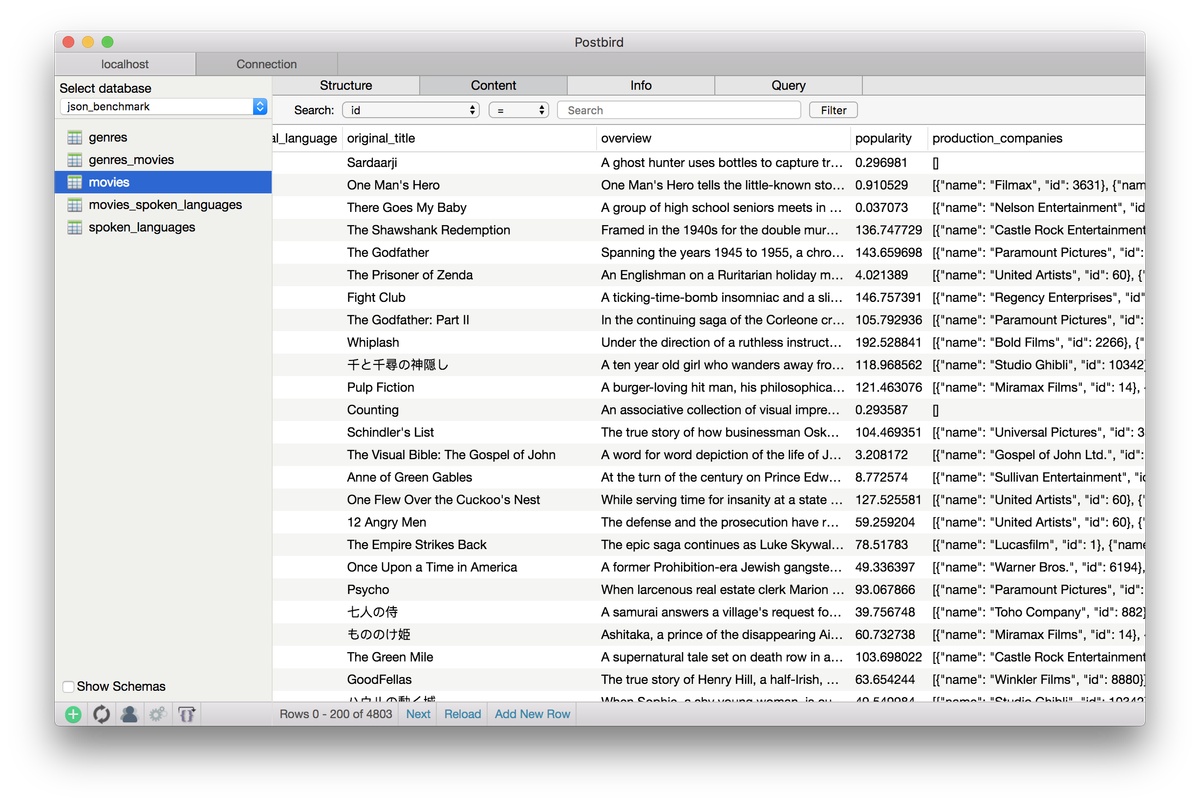
Postbird is a cross-platform PostgreSQL GUI client, written in JavaScript, runs with Electron. It works on Linux, macOS and Windows.
4- PostgreSQL Upgrades Manager (PUM)
PUM (PostgreSQL Upgrades Manager) is a powerful, easy-to-use tool designed to simplify and automate database upgrades for PostgreSQL.
It is inspired by popular migration tools like FlywayDB and Liquibase, PUM uses a smart metadata table to track your database’s evolution over time, ensuring every change is versioned, repeatable, and safe. Whether you're deploying to development, staging, or production, PUM keeps your schema in sync across environments with confidence.
It’s built for real-world workflows: easy to set up, reliable in execution, and perfect for teams that want to avoid the chaos of manual migrations.
If you’re building your app in Python, we highly recommend PUM, it integrates smoothly into your Python projects, letting you manage database changes right alongside your code.
Use it via the command line for quick migrations or plug it directly into your Python scripts for automated deployment pipelines.
With clear versioning, rollback support, and zero external dependencies, PUM helps you build robust, maintainable apps without the overhead. Whether you're a solo developer or part of a growing team, PUM turns database upgrades from a headache into a seamless, repeatable process, so you can focus on what matters: building great software.
PUM's features include:
- Simple CLI & Python Integration: Use PUM as a standalone command-line tool or plug it directly into your Python projects, no friction, just fast setup.
- Automatic Versioning: Track database changes with a built-in metadata table that keeps version history safe and clear.
- Changelog Management: Apply and manage SQL migration files (delta scripts) effortlessly, just add new ones, run the tool, and let it handle the rest.
- Smart Migration Hooks: Run custom SQL or Python code before/after migrations, perfect for data prep, cleanup, or schema tweaks without mixing logic in your app code.
- Clean Separation of Concerns: Keep data logic (tables, indexes) separate from application logic (views, triggers), making your DB structure more maintainable and scalable.
5- DbGate - (no)SQL database client
DbGate is cross-platform database manager. It's designed to be simple to use and effective, when working with more databases simultaneously. But there are also many advanced features like schema compare, visual query designer, chart visualisation or batch export and import.
It supports PostgreSQL among dozens of SQL-based databases as SQL Server, MySQL, Oracle, but it also supports MongoDB, and DuckDB.
You can read about its features in this post.
6- pgCodeKeeper
pgCodeKeeper is an Eclipse plugin that simplifies PostgreSQL development by enabling easy schema comparisons between live databases, pg_dump files, or projects.
Generate migration scripts via a user-friendly interface and track database code in Git, SVN, or other version control systems through Eclipse projects, ideal for teams needing consistent, versioned schema management.
7- Mathesar
Mathesar is a self-hosted, open-source web app that turns PostgreSQL into a user-friendly spreadsheet-like interface. No coding needed, view, edit, query, and collaborate on data securely.
The app is scalable, fast, and integrates seamlessly with existing Postgres setups. Your data stays on your servers, protected by Postgres role-based access.
8- Querym
Querym is a free, open-source, cross-platform GUI tool for MySQL (with more databases coming in 2024). It offers smart SQL autocomplete, code formatting, query protection, data editing, and export to CSV/Excel.
Querym is built for efficiency, it supports saved queries, history, and safe edits, ideal for developers seeking a modern, lightweight database manager.
9- pgcli.com
pgcli is a powerful, user-friendly command-line interface for PostgreSQL that offers auto-completion, syntax highlighting, and a REPL-like experience. Inspired by mycli for MySQL, it makes writing and running SQL queries faster and more intuitive.
Simple to install via Python, it enhances productivity with smart suggestions, real-time feedback, and clean formatting, ideal for developers, data analysts, and DBAs working with Postgres.
SQL Clients for PostgreSQL
- PostgreJS
- asyncpg: A fast PostgreSQL Database Client Library for Python/ asyncio.
- Slonik
- PostgreSQL HTTP Client
Read More
 Hazem Abbas
 Hazem Abbas
 Hazem Abbas
 Hazem Abbas