
The "Fail Late" Trap: Why Your Environment Variables Are a Ticking Time Bomb; Why You Have To Secure Validate Your Env?

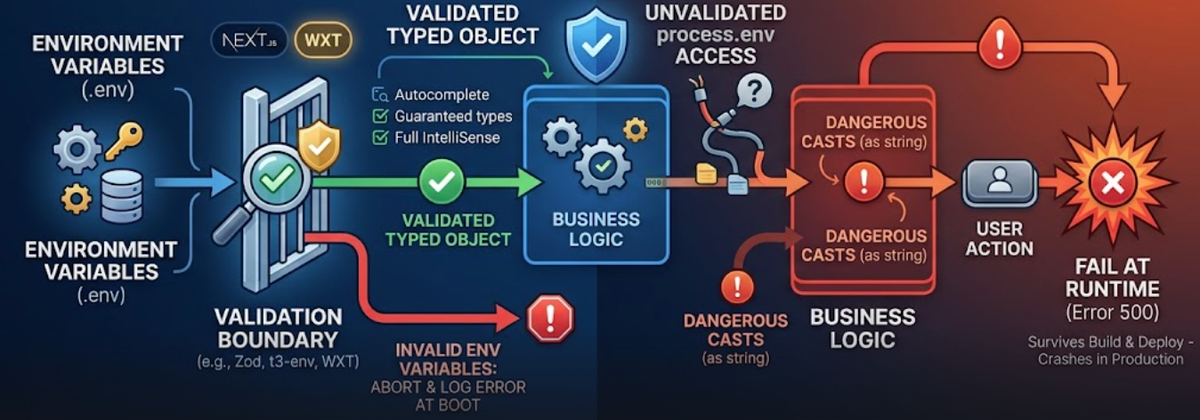
In the modern TypeScript ecosystem, we spend an enormous amount of energy ensuring our business logic is type-safe. We use strict null checks, exhaustive union types, and complex generics to ensure our code is robust. Yet, many of the world’s most experienced developers still leave the front door of their application wide open to catastrophe.
The culprit? The humble environment variable.
If you’ve ever written const apiKey = process.env.API_KEY as string;, you haven’t just satisfied the compiler—you’ve set a trap for your future self. This is the "Fail Late" anti-pattern, and in this guide, we’re going to dismantle why it happens, why it’s dangerous, and how to implement a "Fail Fast" architecture in Next.js and WXT.
Part 1: The 6 Reasons to Stop Accessing process.env Directly
1. The "Fail Late" Nightmare
Accessing variables deep within your business logic means errors only surface at runtime. If a critical Stripe API key is missing, your build script won't care. Your CI/CD pipeline will show green. The app will deploy. It isn't until a user clicks "Checkout" three hours later that the app throws a 500 error because process.env.STRIPE_SECRET is undefined. The goal of any resilient system is to fail as close to the source as possible.
2. The Illusion of Type Security
When you use as string or the ! non-null assertion operator, you are committing "type-lying." You are overriding the compiler’s warning with a pinky-promise that the value exists. This bypasses the primary benefit of TypeScript. If the variable is missing, TypeScript won't save you; it will just watch your code crash.
3. Fragmentation and Cognitive Load
When process.env calls are scattered across 50 different files, the "Contract" of your application is invisible. A new developer joining the project has no way of knowing which variables are required to get the local environment running without trial and error or hunting through a README that hasn't been updated in six months.
4. Semantic Validation
Environment variables are almost always strings by default, but your code needs more than that. Is the PORT actually a valid number? Is the BASE_URL a properly formatted URI? Does the NODE_ENV match one of your allowed environments? Direct access ignores these semantic requirements.
5. Invisible Dependencies (The IDE Problem)
Standard process.env access offers zero autocomplete. You are prone to typos, writing API_Kye instead of API_KEY—which results in a bug that is maddeningly difficult to track down because it looks like a configuration issue when it’s actually a spelling mistake.
6. Deployment Fragility
Modern infrastructure (Vercel, Docker, AWS) relies on environment variables for secret management. If a variable is missing during a build, the deployment should abort immediately. Direct access allows broken, "hollow" builds to reach production, creating a false sense of security.
Part 2: Implementing "Fail Fast" in Next.js
Next.js has a dual-environment problem: some variables are for the server (Node.js), and some are for the client (Browser). Using a library like Zod combined with a dedicated env.ts file creates a firewall at the boundary.
The Implementation
Create a file at src/env.mjs (or .ts). We use .mjs often in Next.js to ensure it works across different module systems.
TypeScript
import { z } from 'zod';

const server = z.object({
  DATABASE_URL: z.string().url(),
  STRIPE_SECRET_KEY: z.string().min(1),
  NODE_ENV: z.enum(['development', 'test', 'production']),
});

const client = z.object({
  NEXT_PUBLIC_APP_URL: z.string().url(),
});

/**
 * You can't destruct process.env in Next.js edge runtimes,
 * so we manually map them.
 */
const processEnv = {
  DATABASE_URL: process.env.DATABASE_URL,
  STRIPE_SECRET_KEY: process.env.STRIPE_SECRET_KEY,
  NODE_ENV: process.env.NODE_ENV,
  NEXT_PUBLIC_APP_URL: process.env.NEXT_PUBLIC_APP_URL,
};

// Merge and Validate
const merged = server.merge(client);
const parsed = merged.safeParse(processEnv);

if (parsed.success === false) {
  console.error("❌ Invalid environment variables:", parsed.error.flatten().fieldErrors);
  throw new Error("Invalid environment variables");
}

export const env = parsed.data;
Now, in your page.tsx or route.ts, you never touch process.env. You import env and get full autocomplete and a guarantee that the data is valid.
Part 3: Environment Safety in WXT (Browser Extensions)
Browser extensions add another layer of complexity. In WXT, you deal with background scripts, content scripts, and popups. If an API key is missing in an extension, you can't just "restart the server." The extension is already on the user's machine.
WXT requires variables to be prefixed with WXT_ to be exposed to the frontend.
The WXT Validation Strategy
Create utils/env.ts. Because WXT auto-imports files in utils/, this becomes available across your extension.
TypeScript
import { z } from 'zod';

const envSchema = z.object({
  WXT_API_URL: z.string().url(),
  WXT_SENTRY_DSN: z.string().min(1),
  WXT_FEATURES_ENABLED: z.enum(['true', 'false']).transform((v) => v === 'true'),
});

function validateEnv() {
  const result = envSchema.safeParse({
    WXT_API_URL: import.meta.env.WXT_API_URL,
    WXT_SENTRY_DSN: import.meta.env.WXT_SENTRY_DSN,
    WXT_FEATURES_ENABLED: import.meta.env.WXT_FEATURES_ENABLED,
  });

  if (!result.success) {
    const message = "❌ Extension Configuration Error: Missing or invalid env variables.";
    console.error(message, result.error.format());
    // In an extension, we might want to alert the developer
    // or log to a remote monitoring service.
    return null;
  }

  return result.data;
}

export const env = validateEnv()!;
Why this is essential for extensions:
Extensions are notoriously hard to debug once deployed to the Chrome Web Store. By validating at the entry point of your background script or popup, you ensure that the extension doesn't silently fail when trying to reach a backend that was never configured in the .env file during the wxt build process.
Part 4: Why Expert Developers Prefer This Pattern
1. Living Documentation
Your Zod schema is the most accurate documentation in your repo. If a developer needs to know what STRIPE_WEBHOOK_SECRET does, they can see its validation rules, its default values, and its expected format all in one place.
2. Atomic Deployments
When using platforms like Vercel or Railway, the build process will execute your code. If you import your env.ts file in your build script (e.g., during static site generation), the build will fail if the variables are missing. This prevents a "broken" site from ever reaching the CDN.
3. Transformation and Sanitization
Zod allows you to transform data. If your environment provides a comma-separated list of admin emails (ADMINS="[email protected],[email protected]"), you can use .transform(s => s.split(',')) in your schema. Now, your business logic receives a clean string[] instead of having to manually split the string every time.
Part 5: Comparing Validation Libraries
While Zod is the industry standard for its balance of power and bundle size, there are other players in the field:
- t3-env: A specialized wrapper designed by the T3 Stack team specifically for Next.js and Vite. It handles the server/client split perfectly and is highly recommended for Next.js projects.
- Envalid: A battle-tested library that is extremely lightweight and works great in pure Node.js environments.
- Effect Schema: For those moving toward the Effect ecosystem, this provides the most powerful type-level transformations available in TypeScript today.
The Verdict: Validate at the Gate
The "Fail Late" pattern is a silent killer of productivity and reliability. By moving your environment variable access to the system boundary and wrapping it in a validation schema, you transform a fragile, string-based system into a robust, type-safe contract.
My personal rule remains: Never read process.env inside business logic. Validate at the door so you can trust your data inside the house.
Do you validate your environment variables at boot? If you’re still using as string, today is the day to refactor. Your users (and your sleep schedule) will thank you.



