
Unlocking Creativity in ADHD Minds: How Open-Source Design Apps Like Tux Paint, Blender, and MagicaVoxel Empower Kids & Teens

By Dr. Hamza Mu, MD | Software Developer & Open-Source Advocate
As a medical doctor, a developer, and an open-source advocate, I’ve spent years observing the unique brilliance of children and teens with ADHD, not through the lens of deficit, but through the prism of untapped potential.
In my own family and community, I’ve watched kids struggle with traditional classroom structures, often dismissed as “distracted” or “unfocused.” But what if their restlessness isn’t a flaw, but a signal? A call to engage them differently?
I’ve come to believe that digital art and design software, especially open-source design apps, can be transformative tools for neurodivergent minds. They offer a creative outlet where curiosity, pattern recognition, and boundless imagination aren’t just tolerated, they’re celebrated.
The ADHD Mind: Not Broken, Just Different
Children and teens with ADHD are not lazy or unmotivated. They’re wired to seek novelty, solve problems intuitively, and think in non-linear ways. Their brains are excellent at pattern analysis, visual-spatial reasoning, and rapid conceptualization, skills that are perfectly suited for digital creation.
Yet, most educational environments fail to harness this energy. Instead, they demand sustained attention on repetitive tasks, exactly the kind of work that triggers frustration and burnout in ADHD minds.
So why do so many apps feel dull, rigid, and uninspiring? Why do so many learning platforms look like outdated textbooks in digital form?
They don’t account for the ADHD brain’s need for immediate feedback, visual stimulation, challenge, and freedom to explore.
 Hazem Abbas
The Power of Open-Source Design Apps for ADHD Learners
Over the past few years, I’ve introduced several open-source design apps to kids and teens with ADHD, watching their eyes light up when they realized they could create something real, right now, without permission or restrictions.
Here are the tools I’ve found most effective:
1. Tux Paint: The Gateway to Creative Confidence
Tux Paint is more than a drawing app, it’s a joyful, guided adventure. With its friendly cartoon mascot, fun sound effects, and simple interface, it lowers the barrier to entry for even the youngest creators.
For kids with ADHD, the instant gratification of seeing their scribbles become a colorful picture is magical.
It teaches them that “making mistakes” is part of creation, not failure.
And yes, Tux Paint is free, ad-free, and open-source. No subscriptions. No tracking. Just pure creative play.
Perfect for ages 3–12, ideal for building confidence and motor skills.
 Omama yahia
2. Inkscape: Vector Art for the Visionary
With Inkscape, kids can create scalable, clean designs, perfect for those who love structure and creativity. ADHD learners thrive here because they can experiment with shapes, colors, and layers without fear of ruining their work.
Great for designing logos, comics, or storybook illustrations, ideal for storytelling-based learning.
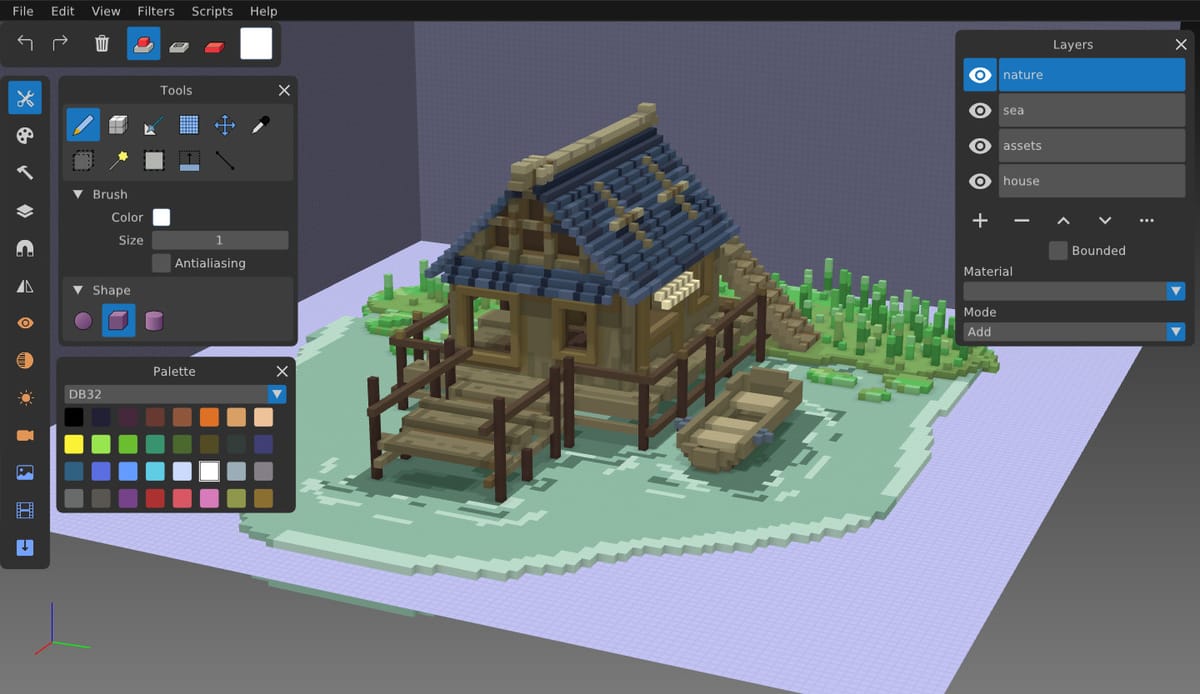
3. MagicaVoxel & Goxel: The Voxel Revolution
This is where things get wildly exciting. Voxel-based design—think Minecraft meets digital sculpture, has transformed how kids with ADHD engage with 3D space.
Minecraft was a game-changer for many neurodivergent kids. It taught spatial reasoning, collaboration, and persistence. But MagicaVoxel and Goxel take it further: they’re lightweight, powerful, and free, perfect for creating voxel art, animations, and even mini-games.
Kids with ADHD often excel at building complex worlds from simple blocks, a skill that translates directly into coding logic, architecture, and even game design.
Ideal for hands-on, tactile learners who think in 3D and enjoy rapid iteration.
 Hazem Abbas
4. Blender: From Hobbyist to Future Creator
Yes, Blender is complex, but it’s also incredibly rewarding. For older teens with ADHD, the ability to animate, model, and render a short film becomes a personal mission. The challenge excites them. The results? Unforgettable.
I’ve seen a teen with ADHD spend hours modeling a character he imagined. no teacher, no pressure, just passion. When he finally rendered his animation, he cried. Not from stress. From pride.
Best for older kids and teens ready for deeper engagement. Use it as a long-term project to build focus and perseverance.
5. Wings 3D: Simple Yet Powerful 3D Modeling
A lightweight alternative to Blender, Wings 3D is perfect for beginners. Its intuitive workflow helps ADHD learners grasp 3D concepts without getting overwhelmed.
Great for prototyping ideas before moving to Blender or MagicaVoxel.
Why Open-Source Matters for ADHD Learning
Open-source software isn’t just about cost, it’s about freedom, flexibility, and trust.
- No ads, no tracking, no paywalls: critical for mental well-being.
- No forced updates or hidden costs: reduces anxiety around “losing progress.”
- Customizable and hackable: kids can tweak settings, try new tools, and feel in control.
- Community-driven: they learn that they’re part of a global network of creators.
When a child with ADHD knows they can play, break, fix, and rebuild without judgment, they begin to see themselves as makers, not just users.
 Hazem Abbas
From Copying to Creating: The ADHD Creative Journey
One of the most beautiful things I’ve observed? Kids with ADHD often start by imitating others, copying a cool Minecraft build, recreating a Tux Paint drawing, or copying a Blender tutorial.
But then comes the magic: they improve it. They add a twist. They change the color scheme. They make it their own.
This process, observe → copy → modify → innovate, is not just artistic. It’s cognitive therapy in disguise. It builds self-efficacy, patience, and resilience.
And crucially, it happens at their own pace. No one says, “You must finish this in 20 minutes.” No ticking clock. Just curiosity.
 Hazem Abbas
The Real Challenge: Sudden Drops & Attention Shifts
Yes, sometimes, after 10 minutes of intense focus, a kid suddenly shuts down and walks away. That’s normal. That’s ADHD.
But instead of frustration, I ask myself: What made them leave? Was it too hard? Too easy? Or did they just reach a natural stopping point?
The key is minimal intervention. Let them explore. Watch. Guide only when asked. Celebrate the attempt, not just the outcome.
Because the goal isn’t perfection. It’s engagement.
Final Thoughts: Redesigning Learning for Neurodiverse Minds
We’ve been teaching kids with ADHD to conform. But what if we stopped trying to fix them, and started helping them shine?
Digital art and design, especially through open-source design apps like Tux Paint, MagicaVoxel, Blender, and Inkscape, offer a pathway to self-expression, confidence, and joy.
These tools don’t just teach skills. They teach identity: “I am creative. I am capable. I belong.”
And in doing so, they transform lives.
Advice for Parents, Educators, Therapists & Caregivers
If you’re supporting a child or teen with ADHD, consider this your invitation to embrace creative technology:
- Start Simple: Begin with Tux Paint or MagicaVoxel. Low pressure, high fun.
- Let Them Lead: Don’t dictate the project. Let them choose what to draw, build, or animate.
- Celebrate Process Over Product: Did they try something new? That’s success.
- Use Open-Source Tools: Free, safe, and empowering. No subscriptions. No ads.
- Create a “Creative Corner”: A dedicated space (physical or digital) where they can explore freely.
- Show, Don’t Tell: Share cool examples from YouTube or the open-source community. Let curiosity drive.
- Be Patient with Drops: If they walk away, don’t push. Return later. The spark will still be there.
- Connect with Communities: Join forums like the Tux Paint mailing list or Blender Artists. These kids belong.
 Hazem Abbas
Let’s stop asking “Why can’t they focus?”
Let’s start asking: “What if they’re already focused, on something amazing?”
With the right tools, the right mindset, and a little trust, every child with ADHD can discover their creative superpower, one pixel, one block, one stroke at a time.



